Introduction
DoubleD turns a single vocal take into an ensemble of 2, 4, 8 or 16 singers — without ever sounding like a Chorus or Flanger pedal. Instead of sweeping a delay, a pitch or a filter, it builds a small number of "virtual takes": each one a slightly different singer, placed within 40 milliseconds of your original, while the original vocal itself keeps its pitch, tone and place — centred, unprocessed, out front.
Every virtual take differs from your lead in five ways at once: when it starts singing (its timing), what it sounds like (a touch darker or brighter), its micro-pitch (a few fixed cents sharp or flat — never wobbling), how loud it is from moment to moment, and where it sits in the stereo or immersive field. That combination is what makes an ensemble sound like people, not like an effect.
The Core Idea
Most doublers make you sound doubled by literally repeating you — a copy, a pitch-shift, a slow sweep. DoubleD asks a different question: what would actually be different if three more singers had stood next to you and sung the same part? Time first, then tone, pitch, level and position — never a moving filter, never a periodic wobble.
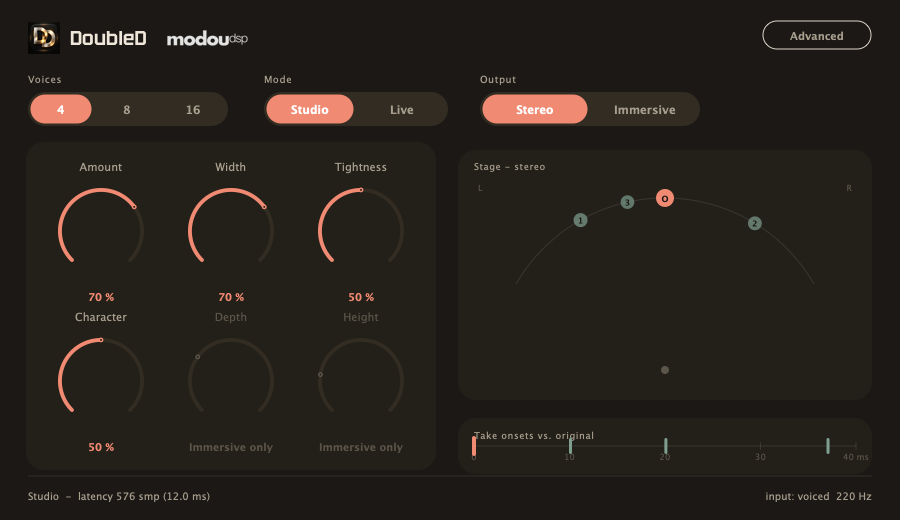
Time-First Engine
Every virtual take's biggest difference from the lead is when it lands — 0 to 40 ms later, at a fixed spot it never wanders from mid-syllable.
Consonant-Safe
DoubleD listens for attacks and consonants and quietly holds virtual takes back during them, so even 16 voices never turn one "s" into sixteen overlapping hisses.
Static Character, No Wobble
Each take's micro-pitch and tone are fixed values, not an LFO. Nothing moves on a long sustained note — which is exactly what keeps this from turning into a Chorus or Flanger.
Stereo or Immersive
Switch outputs without regenerating the ensemble: the same virtual takes are simply re-rendered into the new space, and the lead always stays centred.
First Steps
- Load DoubleD on the vocal track you want to double.
- Pick Voices — 2, 4, 8 or 16 — the total number of singers you want to hear, original included.
- Leave Mode on Studio and Output on Stereo for your first pass; you can change either at any time, even while playing.
- Set Amount to taste — it is a source/effect crossfade: 0% is your original alone, 100% is the ensemble alone. Then use Width to spread the virtual takes left and right around the centred lead.
- Use Tightness to decide how closely the takes hug the original in time, and Character to decide how different they sound from it.
- Play the track with Voices = 4 first — the smallest, easiest change to judge — before moving up to 8 or 16.
Quick Examples
Lead vocal, 4 voices
Start with Voices = 4, Amount around 40%, Width around 50%. This is the smallest, most natural-sounding double — body for a verse without turning it into a "produced" stack.
Chorus / hook, 8–16 voices
Push Voices to 8 or 16 for a hook or chorus, raise Amount and Width, and use Character to push the virtual takes' tone further from the lead so the section reads as a crowd, not a copy.
Immersive mix
Switch Output to Immersive on a 7.1.4 bed and bring up Depth and Height gradually — small amounts first, so the ensemble wraps around without burying the lead's centre image.
Understanding the Display
DoubleD's window is built around one idea: you should always be able to see where every voice sits in time and space, not just hear it.
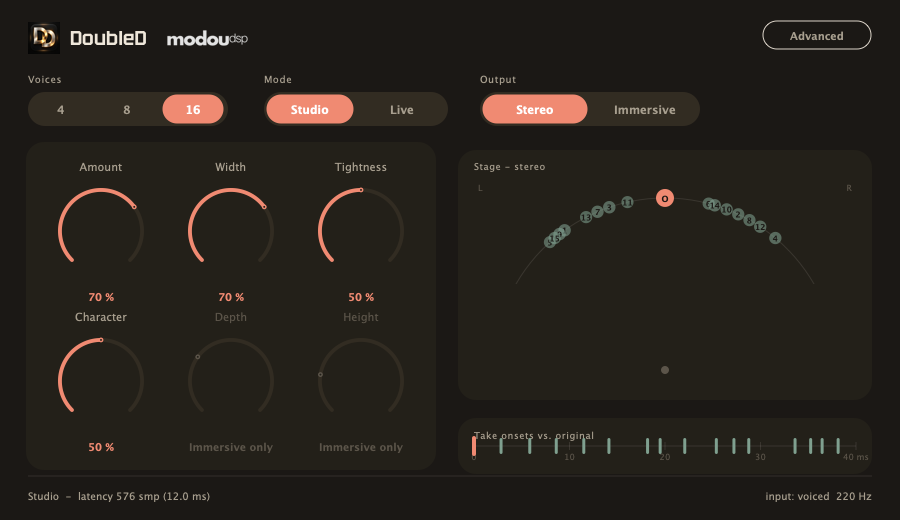
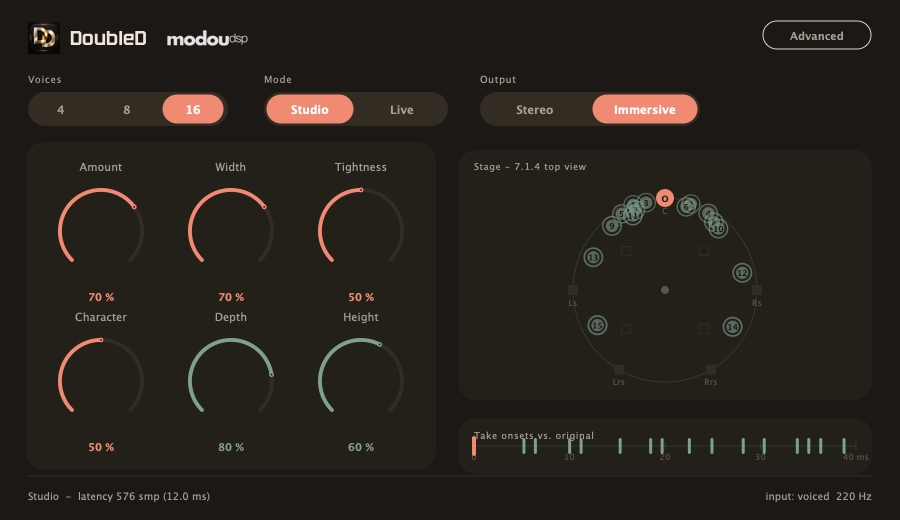
Stage View
The panel on the right draws a top-down view of the ensemble — a stereo arc, or a full 7.1.4 circle in Immersive. The original (O) always sits at dead centre front; each virtual take is a numbered dot at its current, live position.
Take-Onset Strip
Below the Stage view, a 0–40 ms ruler shows exactly when each virtual take's onset lands relative to the original — the one hard rule DoubleD never breaks, made visible.
The Six Musical Knobs
Amount, Width, Tightness, Character, Depth and Height are deliberately the only controls on the main view. Depth and Height only light up in Immersive — in Stereo they're inactive, because there's no front-to-back or height axis to place a take on.
Advanced Panel
Click Advanced to open a read-out table of every take's exact timing, pitch, tone, formant, level and articulation-protection amount, plus small nudge sliders and two analysis meters — never required for everyday use, always there when you want to look under the hood.
Mouse & Keyboard
DoubleD's controls follow the same conventions as the rest of your plugins, so there's little to memorise.
| Gesture | Action |
|---|---|
| Drag up / down | Adjust a knob's value |
| Shift + drag | Fine adjustment |
| Double-click | Reset to the default value |
| Scroll wheel over a knob | Nudge the value up or down |
| Click a Voices / Mode / Output segment | Switch immediately, with a short automatic crossfade so nothing clicks |
Product Overview
DoubleD is a vocal ensemble doubler: put in one voice, choose 2, 4, 8 or 16, and get out an ensemble that sounds like that many singers actually stood together and sang the same part — never a Chorus, Flanger or Phaser effect, and never a new reverb or delay tail.
Everything DoubleD adds is confined to a 40-millisecond window after your original. The original's pitch, tone and position are never touched, no matter how you set any control; Amount only decides how much of it versus the ensemble you hear.
Six Product Principles
- Voices sets the total number of singers you hear (2 / 4 / 8 / 16), which creates 1 / 3 / 7 / 15 virtual takes.
- The original is always the front-centre reference. No control moves its pitch, tone or position; Amount is a source/effect crossfade that sets its level (0% original only, 100% ensemble only).
- Every virtual take's onset lands within 0–40 ms of the original — measured on the final output, internal processing included.
- Time is each take's primary difference; tone, micro-pitch, articulation and level differences layer on top of that.
- No Phaser, Flanger or Chorus: no periodic delay/pitch/filter modulation, no phase sweeping, no feedback, no repeats.
- No new reverb or delay tail: your vocal's own sustain is preserved, but DoubleD never adds a repeat or a room of its own.
User Interface
Voices, Mode & Output
Voices
2, 4, 8 or 16 — always the total number of voices you hear, original included, which makes 1, 3, 7 or 15 virtual takes. Changing Voices during playback crossfades smoothly; nothing clicks or jumps in level.
Mode: Studio vs. Live
Both modes support all four Voices counts, the full 40 ms take window and both output spaces. The difference is what each one optimises for.
| Property | Studio | Live |
|---|---|---|
| Priority | Most natural take quality | Lowest monitoring latency |
| Syllable analysis | Finer, steadier onset/voicing analysis | Fast, short analysis window |
| Pitch/time interpolation | Higher-quality (cubic) | Low-latency (linear) |
| Reported latency | A small, fixed extra delay — reported to your host | Minimal in-plugin delay |
40 ms is always the ceiling on take timing, in both modes — it is not the same number as the plugin's own reported latency. Live's monitoring latency is measured and reported honestly; DoubleD never claims a zero latency it hasn't verified.
Output: Stereo vs. Immersive
Stereo places the original dead centre and spreads virtual takes left/right with Width. Immersive renders onto a 7.1.4 bed: takes move in X (left/right), Y (front/back, via Depth) and Z (height, via Height), while the original stays front-and-centre. Switching Output re-renders the same takes into the new space — it never regenerates them, and never simply sums channels together.
Main Controls
Six knobs are all you need for everyday use. None of them are expressed in milliseconds, cents or formant units on the main view — DoubleD makes those decisions for you; the Advanced panel is where you can see and nudge the raw numbers.
Depth and Height are inactive (greyed out) whenever Output is Stereo — a two-speaker field has no front/back or height axis to place a take on.
Advanced Panel
The Advanced panel is optional. DoubleD never needs it open to sound right — it's there for the moments you want to see, or gently nudge, exactly what each take is doing.
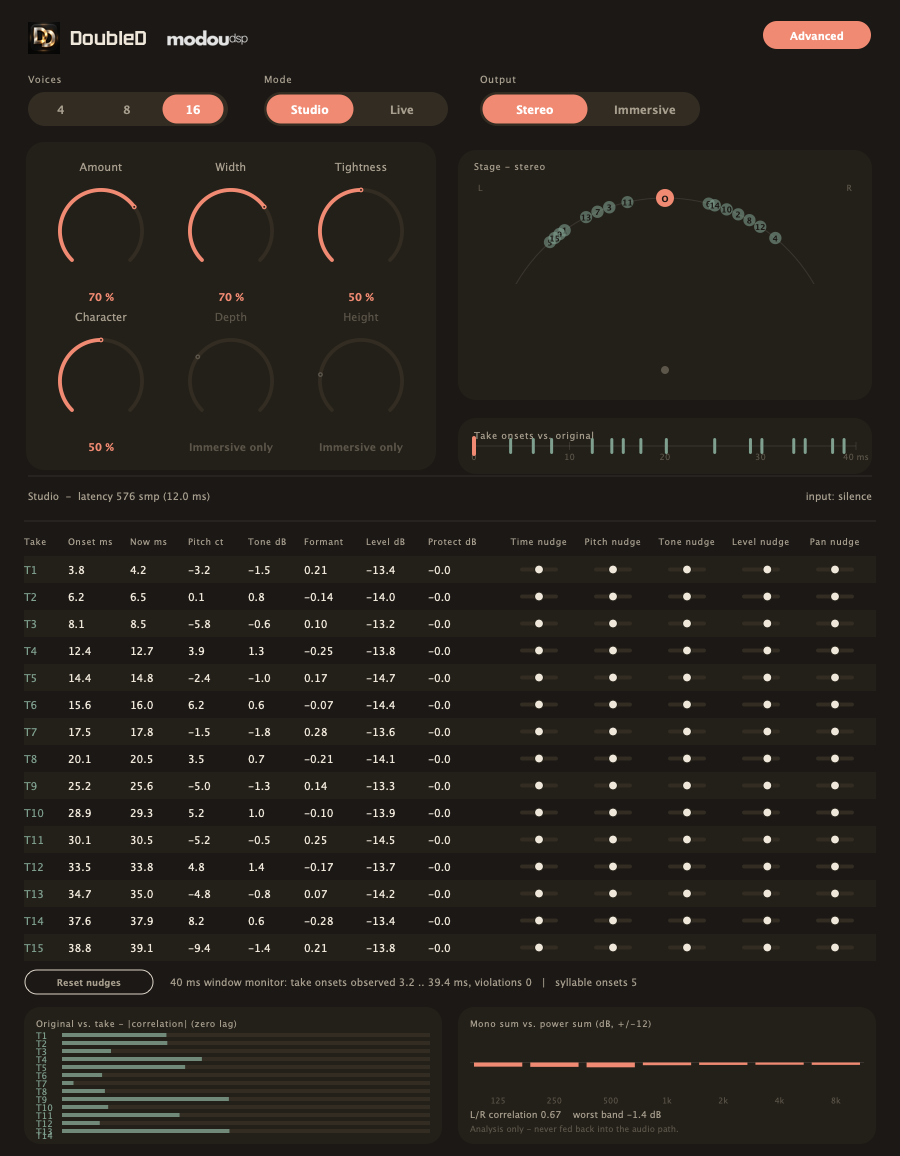
Per-Take Read-Out
One row per virtual take, showing exactly where its onset was anchored, where it is landing right now, its micro-pitch in cents, its tone (tilt) in dB, its formant character, its level in dB and how much articulation protection is currently being applied.
Nudge Sliders
Five small sliders per take — Time, Pitch, Tone, Level and Pan — let you adjust one outlier voice without touching the whole ensemble. All zero means the untouched factory ensemble; any change is saved with your project and reproduces exactly on reload.
Analysis Meters
Original↔take correlation and mono-sum-vs-power-sum are shown purely as analysis — DoubleD never feeds these numbers back into the sound automatically. If a bar looks unusually high, or a band in the mono-sum meter dips, that's your cue to nudge that take's tone, position or level by hand.
Workflow Examples
Lead Vocal Thickening
Voices = 4, Mode = Studio, Amount ≈ 40%, Width ≈ 45%, Tightness ≈ 60%. A subtle double that adds body to a verse without drawing attention to itself.
Chorus Hook
Voices = 16, Amount ≈ 80%, Width ≈ 85%, Character ≈ 70%. A big, obviously-multiple-singers moment for the loudest part of the song.
Backing Vocal Stack
Voices = 8, Amount ≈ 60%, Tightness ≈ 70% (keep them close in time), Character ≈ 50%. Sits behind the lead instead of competing with it.
Immersive Bed
Output = Immersive on a 7.1.4 bus, Depth ≈ 30%, Height ≈ 20% to start. Raise gradually while checking that the lead's centre image stays intact.
Pro Tips
- Start at 4 Voices before jumping to 16 — it's the easiest change to judge by ear, and most of what a setting does is already audible there.
- Use Tightness and Character together: loose + different reads as a human crowd; tight + similar reads as one thicker voice.
- Automate Amount to move between the dry vocal and the ensemble — for example from the verse (low Amount) into the chorus (high Amount) — without swapping presets or re-balancing anything else.
- In Immersive, start Depth and Height low and bring them up while listening on headphones or a calibrated monitor system — small amounts go a long way.
- Use Advanced nudges sparingly, and only on the one take that stands out — the factory ensemble is already deterministic and balanced.
- Before printing for broadcast or mono playback, check the Advanced panel's mono-sum meter to confirm nothing cancels unexpectedly.
Specifications
| Plugin Formats | VST3, AU, AAX, Standalone |
| Plugin Identity | Plugin code DblD, manufacturer code moDu, bundle id com.modoudsp.doubled |
| Platform | macOS, Universal (Apple Silicon + Intel) |
| Voices | 2, 4, 8 or 16 (1, 3, 7 or 15 virtual takes) |
| Take Window | 0–40 ms from the original, in every mode and at every setting |
| Channel Handling | Mono or stereo in; Stereo or SMPTE 7.1.4 out |
| Latency | Studio: 12 ms fixed (measured at 44.1 / 48 / 96 kHz). Live: effectively 0 ms plugin-reported (host I/O buffer not included). |
| Sample Rates | 44.1 kHz to 96 kHz tested |
License & Support
DoubleD is developed by modou dsp (modoudsp.com). For licensing questions, updates or support, please get in touch through the modoudsp website.
DoubleD is an early, actively-developed release. Its sound and interface are expected to keep evolving — check back for updates.
Chapter 1 — Why Not a Chorus?
A Chorus pedal creates thickness by continuously modulating a copy's delay time and pitch with an LFO. It works, but it has a signature: a slow, audible wobble, and a sound that's unmistakably "an effect" rather than "more people."
DoubleD's brief ruled that signature out from the start: no periodic delay, pitch or filter modulation; no phase sweeping; no feedback; no repeats. Every difference between a virtual take and the original is a fixed value, decided once per syllable and held — never an oscillation.
If DoubleD's ensemble ever starts to sound like a Chorus or Flanger, something is wrong. That's not a taste question — it's the one product rule that was never allowed to bend.
Chapter 2 — Time First, Then Everything Else
The first and biggest difference between any virtual take and your lead is when it starts. 4 voices places three takes at roughly 12, 24 and 35 ms; 8 voices places seven takes spread from about 9 to 38 ms; 16 voices packs fifteen takes between about 4 and 38 ms — never mechanically evenly spaced, the way a real group of singers never lines up exactly either.
0 ms
3 takes, ~12/24/35 ms
7 takes, ~9–38 ms
15 takes, ~4–38 ms
Every one of those numbers is clamped so the final onset — after any internal processing — never exceeds 40 ms from the original. And, like a choir following a conductor, the takes share one beat but nobody is reliably early or late: the same set of arrival times is dealt out to the singers in a different order on every syllable, so there is no repeating echo pattern to give the effect away. Tone, micro-pitch, level and position are layered on top of that timing only afterward.
Chapter 3 — Protecting Consonants
Sixteen overlapping copies of the same "s" or "t" don't sound like sixteen singers — they sound like a mess of hiss. DoubleD listens for attacks and consonant energy and quietly pulls virtual takes back during them, then lets them return to full presence as soon as the vowel opens up.
That gain change is a short, smooth ramp tied to what the input is actually doing — never a hard on/off switch, and never something that fires on a timer regardless of the material.
This is also why DoubleD analyzes syllable structure at all: not to change your pitch or add harmony, but purely to know when to let the ensemble be heard and when to protect the original's articulation.
Chapter 4 — Static Character, Not Modulation
Each virtual take carries a small, fixed spectral tilt and a few cents of micro-pitch — set once from a deterministic table for the current Voices count, then scaled by Character. On top of that, every syllable draws a small extra pitch offset of up to ±5 cents: it is derived from the syllable's position in the timeline, not from a random number generator, so the same performance always reproduces the same ensemble. None of it moves during a sustained note.
The one exception is at syllable boundaries: a take may re-seat its timing, choose a new pitch offset and a slightly different loudness — a choir member is never exactly as loud as the next one — each one a new, still-fixed value for the next syllable. Nothing changes mid-vowel, which is exactly the difference between an ensemble and a modulation effect.
Because the same audio and settings always draw from the same deterministic table, the same performance renders identically every time — on playback, after an offline bounce, and after reopening the project.
Chapter 5 — Studio vs. Live
Studio spends a little more time analysing syllable boundaries and a little more care on pitch/tone processing, in exchange for a small, fixed, reported latency. Live keeps the same analysis but trims it down and uses a lower-latency interpolation path, so you can track through DoubleD in real time.
The 40 ms take-timing rule holds in both modes — it's a property of the ensemble, not of how much monitoring latency you're willing to accept. Live's actual round-trip latency is measured, not assumed, and reported honestly rather than claimed as zero.
Chapter 6 — Stereo and Immersive, From the Same Takes
DoubleD keeps one set of virtual takes and two renderers for them. Stereo pans each take left or right around the still-centred original. Immersive places the same takes in a 7.1.4 bed using X (left/right), Y (front/back) and Z (height) — a genuine circular placement around the listener, not a front-only wedge.
Switching output formats re-renders position and level for the new space; it never regenerates the ensemble and never simply sums channels together. An Immersive mix folded down to stereo is checked the same way — by ear, and with the correlation and mono-sum metering in the Advanced panel — to make sure the centre image and low end survive the fold.