CYANO CH — Channel Compressor
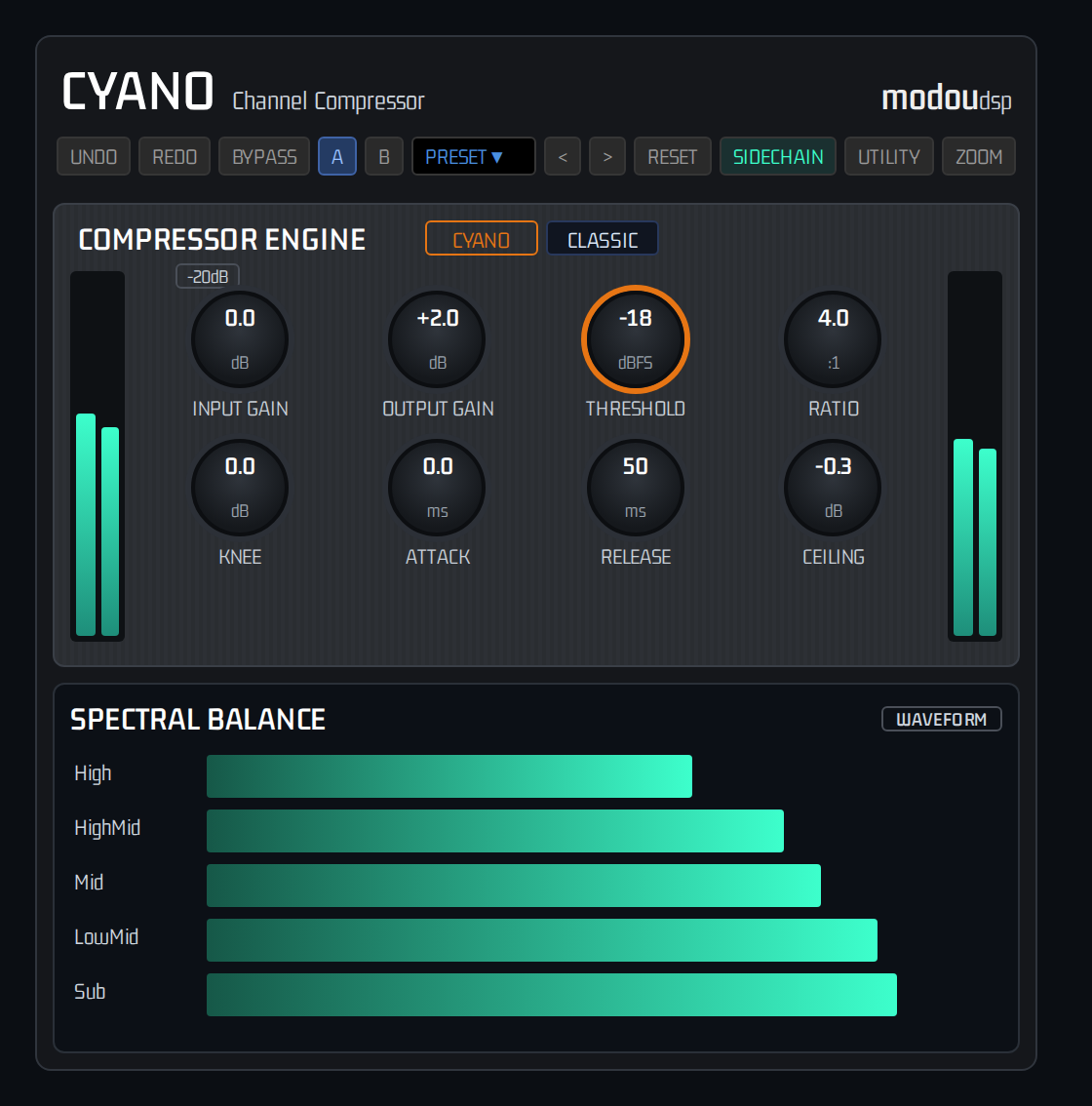
CYANO CH brings the CyanoCore™ engine to channel and bus dynamics. One compact window holds the Compressor Engine and the Spectral Balance panel.
With the CYANO engine only the Crest above the threshold is reduced and the Bed stays untouched. The CLASSIC engine behaves like a conventional compressor. An optional external sidechain can drive the detector.
CYANO CH runs as VST3, AU, AAX and Standalone on mono or stereo tracks. Offline mastering, Album assembly and Delivery Targets are part of CYANO, not CYANO CH.
Product Family Overview
The CYANO Platform has three products that share the CyanoCore™ engine. This table lists what each one actually contains.
| Feature | CYANO | CYANO CH | CYANO GLUE |
|---|---|---|---|
| Role | Mastering processor | Channel compressor | One-panel processor |
| CYANO / CLASSIC engine | ✓ | ✓ | ✓ |
| Compressor controls | Full engine | 8 knobs | Threshold orb + gain faders (ratio and timing fixed) |
| External sidechain | — | ✓ | — |
| Master EQ & Spectral Balance | ✓ | ✓ | — |
| Delivery Target | ✓ | — | ✓ |
| Offline mastering, Album & Export | ✓ | — | — |
| Visualizers | Full set (Topology, Goniometer, Spectrogram, Timeline) | Spectral Balance (Monitor, Timeline, Radar) | Orb (SCAN, FIELD, RADAR) |
| Preset slots | A – D | A – B | A – B |
| −20 dB input pad | ✓ | ✓ | ✓ |
| Formats | VST3 · AU · AAX · Standalone | VST3 · AU · AAX · Standalone | VST3 · AU · AAX · Standalone |
Which Product Are You Using?
CYANO
Complete process. Reference implementation of CyanoCore™ with full control of Threshold, Ratio, Topology, Delivery.
CYANO GLUE
Set threshold to catch only peaks, adjust output gain to show target corresponding to output loudness.
CYANO CH
Understand full version first, then CYANO CH for channel dynamics. CLASSIC mode like conventional compressor and CYANO mode preserves Bed and controls only peaks.
Introduction
Welcome to CYANO Platform — professional audio processor family based on CyanoCore™. Shares same philosophy and quality with different workflows. Delivery target is defined as translated reference position, not peak.
CYANO is dynamics processor designed from fundamentally different premise. Musical cohesion (Glue) is not achieved by compressing mix uniformly over time, but by preserving musical Foundation. While conventional compressor applies single gain envelope to entire mix signal whenever threshold is exceeded, CYANO splits signal into two domains and processes independently.
Origin of Name — Cyanoacrylate
Name comes from compound cyanoacrylate known as instant adhesive. Like instant adhesive that forms strong bond without adding volume or deforming objects, CYANO creates powerful musical Glue where instruments blend harmoniously without collapsing musical Bed.
Glue Principle
In audio, Glue means cognitive effect where mix instruments interact consistently like single organism. Traditional compression tries to mimic by attenuating all elements simultaneously, but result transforms music via unwanted envelope alteration. CYANO achieves true Glue by controlling only Crest region above threshold that breaks proportional relationships, while continuously maintaining Bed.
- Bed Preservation: All signals below threshold pass without alteration.
- Crest Optimization: Gain reduction only to excessive energy above threshold.
- Musical Glue: Cohesion achieved by preserving, not collapsing, relationships.
- Visual Topology: Check split state in real time.
What This Manual Covers
This document serves as both professional user guide and technical white paper. Reader is assumed professional engineer familiar with gain reduction, attack/release, loudness normalization.
Why Traditional Bus Compression Transforms Music
Most widespread misconception is that compressor only reduces peak signal exceeding threshold. In reality it never works that way.
What actually happens: Moment transient peak exceeds threshold, gain reduction is applied equally to entire signal coexisting in mix at that moment. Compressor cannot distinguish peak instrument that triggered event from other instruments in bus signal.
When -3 dBFS kick exceeds -6 dBFS threshold, vocal, reverb, strings not exceeding threshold are uniformly attenuated, envelope deformed.
- Envelope deformation, Loss of spatial depth, Cognitive density distortion, Relationship distortion
Fundamental architecture problem: Traditional compressor compresses everything whenever peak occurs. Larger gain reduction, more Bed damaged, structural limit unsolvable by attack/release tuning.
Why CYANO Exists
CYANO excludes global attenuation and achieves perfect musical Glue. Inspired by fact that arbitrary audio signal can be perfectly modeled as sum of two components.
A = B + C
A: Entire original signal
B (Bed): Sustained source below threshold, harmonics, root
C (Crest): Headroom-exhausting peak energy
Instead of shaving A, CYANO isolates: Output = B + C′
B: Passes without alteration, actual output uses B
C′: Optimized Crest
When kick transient occurs, gain reduction applies precisely only to Crest region exceeding threshold. Vocal or room (Bed) untouched, so no pumping.
Glue Through Preservation and Loudness is final stage only — musical optimization and delivery level perfectly separated.
Bed vs Crest
Threshold as Partition Boundary
In traditional compressor threshold is 'point where compression starts'. In CYANO definition is different and more precise: Partition Boundary dividing Bed and Crest domains.
Bed: Musical Foundation
All components below threshold such as instrument sustain body, reverb tail, noise floor, reaching output without gain reduction.
Crest: Excessive Peak Energy
Signal soaring beyond threshold such as transient hits, only region subject to dynamics operations. Also target for full utilization of headroom because peak is controlled.
Precise Split Process
B/C split calculated in real time at internal oversampling rate. Dual EMA smoothing blocks noise, ensuring clean sound during automation.
Steady-State Identity
With fixed threshold, split satisfies B + C = A at every sample, output perfectly matches input when no crest energy.
Core Concepts
Bed: signal below threshold, always preserved foundation. Crest: signal above threshold, excessive energy peak subject to dynamics. Threshold: partition boundary level. Glue: natural cohesion obtained by protecting foundation. Target: final platform loudness spec and input/output gain adjustment guide.
Quick Start
Workflow Principle
Set the threshold so that only the excess Crest is reduced, then match the level with Output Gain.
- Insert CYANO CH on a channel or bus and keep the engine on CYANO.
- Keep ATTACK at its minimum (0.01 ms) so the Crest is caught cleanly. The default RATIO is 8:1.
- Play the loudest passage and lower THRESHOLD from −0.1 dBFS. The teal line on the IN meter shows where the Bed / Crest split sits — lower it until only the peaks cross it.
- Stop just before the body of the sound starts to move. The Bed should sound identical to the input.
- Set RELEASE and KNEE to taste, then use OUTPUT GAIN to match the level. Toggle BYPASS to compare with the original.
- Store the result in slot A, make a variation in slot B and switch between the two.
Signs of Correct Operation
- Drum hits and plucks stay tight and clear
- Sustain and room tone keep their original level
- No audible pumping
Interface
CYANO CH has a header and two panels: COMPRESSOR ENGINE on top and SPECTRAL BALANCE below. The window is 514 × 592 at 100 % and keeps its proportions when resized between 75 % and 200 %; the ZOOM menu offers 75, 100, 125, 150 and 200 %.
Header
UNDO and REDO, BYPASS, the A and B slots, the preset name with its previous / next buttons, RESET, SIDECHAIN, UTILITY and ZOOM. See Presets, Slots & Utility.
COMPRESSOR ENGINE
The CYANO and CLASSIC engine buttons sit next to the title. Eight knobs are arranged in two rows of four, the −20dB pad is above them, and the IN and OUT stereo meters frame the panel on the left and right. See Compressor Engine Controls.
The meters read −60 to 0 dB. A teal bar shows the peak, an amber line the loudness, and a faint ghost bar the input peak. The IN meter also carries the threshold line with its value.
SPECTRAL BALANCE
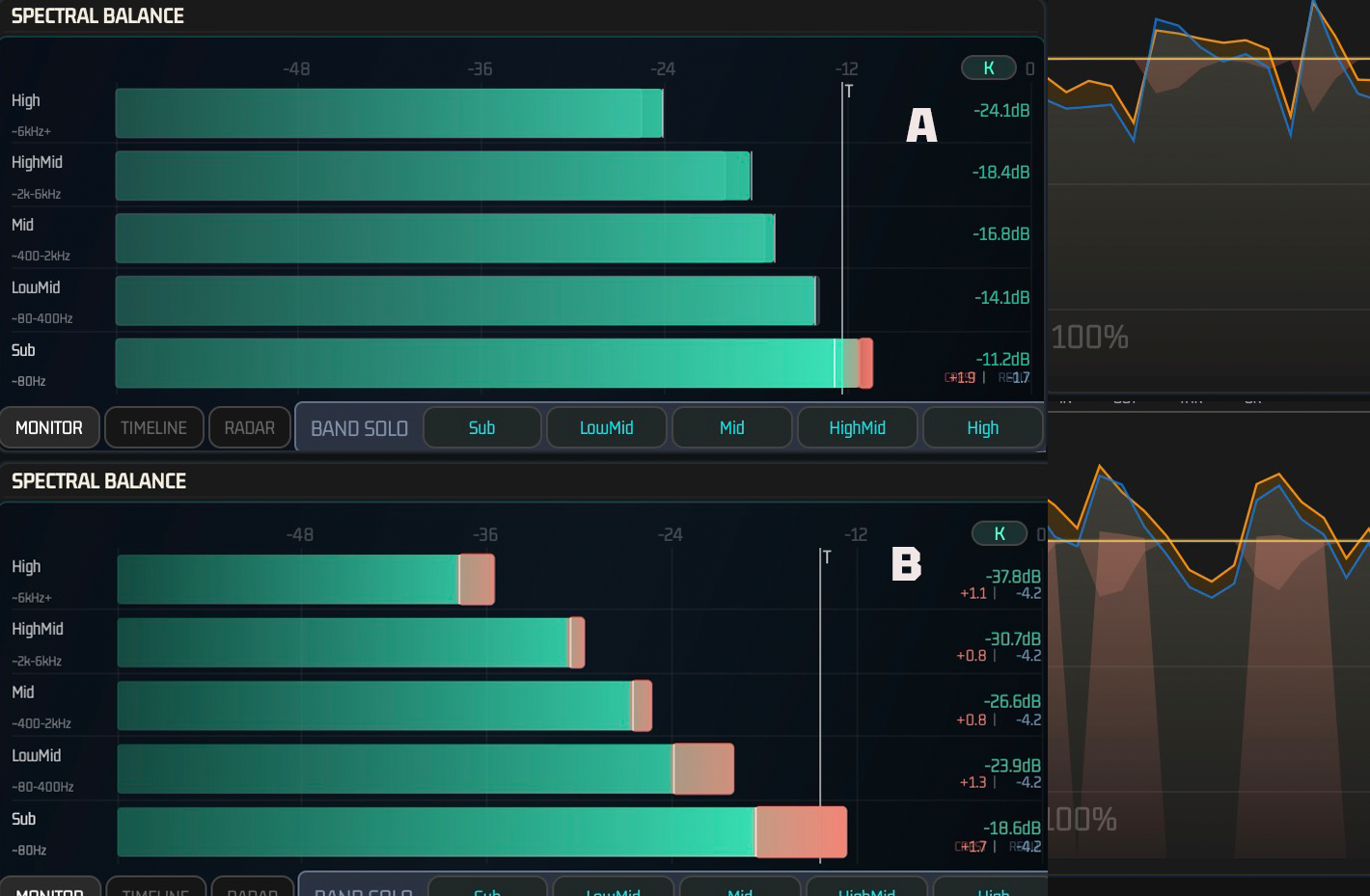
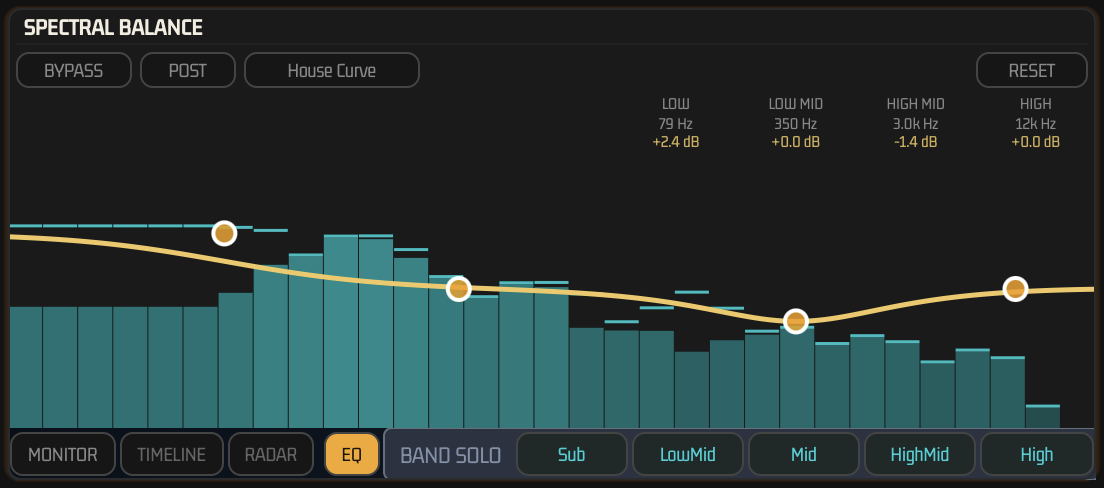
The bottom row has the MONITOR, TIMELINE and RADAR views, the EQ tab and BAND SOLO (Sub, LowMid, Mid, HighMid, High). The EQ tab opens the Master EQ overlay — see Master EQ.
WAVEFORM, at the top right, slides in two panels: ORIGINAL (the input waveform) on the left and OUTPUT on the right. On OUTPUT the mouse wheel zooms the dB scale and a double-click resets it. HIDE closes both panels.
- The THRESHOLD knob is 30 % larger than the other knobs.
COMP CURVE
Click COMP CURVE, to the left of WAVEFORM, to slide in the compressor graph; HIDE closes it. Only one of the two opens at a time. The graph draws the input → output curve from the live THRESHOLD, RATIO and KNEE settings (−48 … 0 dB), and a point with a short trail moves on it with the current input peak and gain reduction.
- CYANO: the band below the threshold is shaded as the untouched bed; only the crest above it is compressed. The live column at the point splits into the bed, the compressed crest and the gain reduction, and the GR readouts show the reduction of the crest alone.
- CLASSIC: the whole signal above the threshold is reduced. The live column splits into the scaled signal and the gain reduction.
Compressor Engine Controls
The eight knobs show their value in the centre. All of them are automatable.
| Control | Range | Default | Function |
|---|---|---|---|
| INPUT GAIN | −24 … +24 dB | 0 dB | Gain after the −20dB pad, in front of the detector. Double-click returns to 0 dB. |
| OUTPUT GAIN | −24 … +24 dB | 0 dB | Final level, applied after the compression and the Master EQ. Double-click returns to 0 dB. |
| THRESHOLD | −40 … −0.1 dBFS | −4.0 dBFS | The Bed / Crest boundary. In CYANO mode only the signal above it is reduced. |
| RATIO | 1 … 20 : 1 | 8 : 1 | How strongly the signal above the threshold is reduced. The maximum is reported as Inf:1 to the host. |
| KNEE | 0 … 6 dB | 0 dB | Softens the transition around the threshold. |
| ATTACK | 0.01 … 10 ms | 0.01 ms | How fast the gain reduction engages. Keep it at the minimum for clear Crest control. |
| RELEASE | 1 … 1000 ms | 80 ms | How fast the gain reduction recovers. |
| CEILING | −3 … 0 dB | −0.1 dB | Final peak ceiling. After the CLIPPER, a hard limit at this level keeps the output from exceeding it. |
−20dB pad
Attenuates the input by 20 dB at the very front of the chain, ahead of INPUT GAIN. Both meters read after the pad, and the pad stays active in BYPASS.
CYANO and CLASSIC
In CYANO mode only the signal above THRESHOLD is reduced. In CLASSIC mode THRESHOLD is an ordinary compressor threshold for the whole signal. See Processing Modes below.
Not shown in CYANO CH
MIX, LOOKAHEAD, RELEASE SHAPE and CONTOUR have no control here and keep their default values (MIX 100 %, LOOKAHEAD 1.5 ms). The lookahead adds the same amount of latency, which CYANO CH reports to the host.
Processing Modes
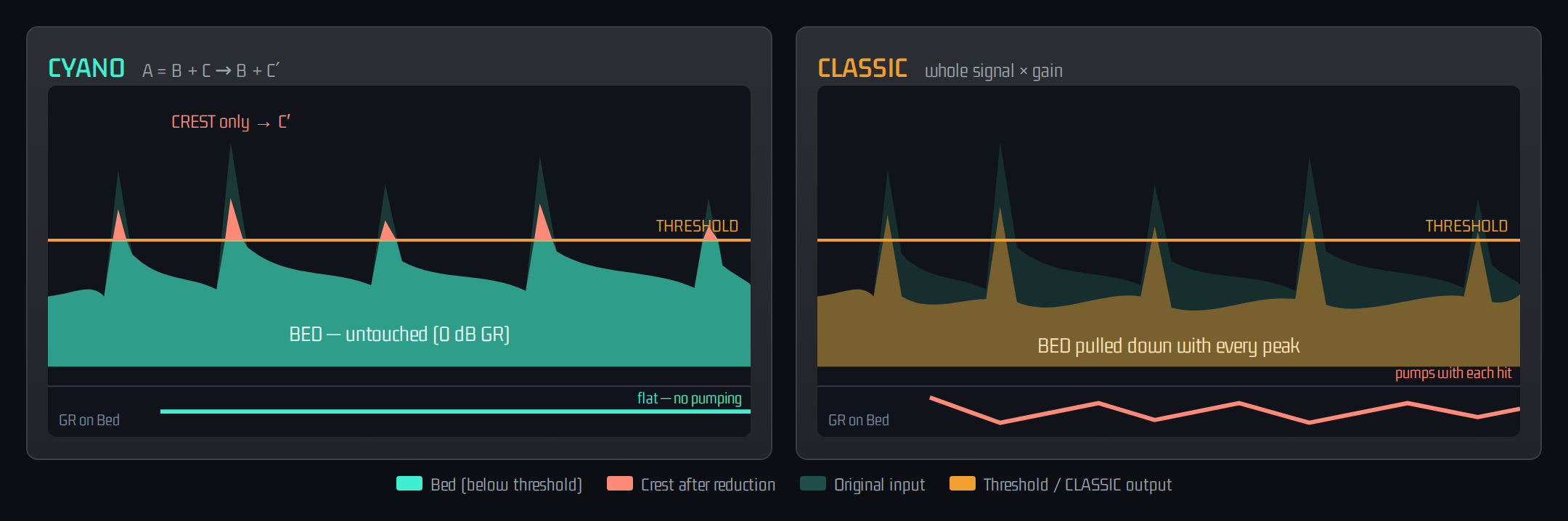
CYANO Mode: A = B + C topology, preserves sustain and reverb, maintains proportional relationships, builds best musical glue.
CLASSIC Mode: Traditional feed-forward compressor applies uniform gain reduction to entire signal. Use for pumping stylization.
| Feature | CYANO | CLASSIC |
|---|---|---|
| Bed attenuation during GR | None — 100% preserved | Yes — entire simultaneous |
| Crest peak target control | Supported | Not supported — whole batch |
| Artificial pumping | Structurally impossible | Always present (setting dependent) |
Sidechain
Click SIDECHAIN in the header to open the sidechain panel. It has a Self / Ext selector and three knobs that shape the signal the detector listens to.
| Control | Range | Default |
|---|---|---|
| SOURCE | Self · Ext | Self |
| HPF | 20 … 1000 Hz | 20 Hz |
| LPF | 1 … 20 kHz | 20 kHz |
| GAIN | −24 … +24 dB | 0 dB |
How it works
- Self — the detector listens to the plug-in's own input. Ext — it listens to the host's sidechain input.
- The signal passes GAIN, then HPF, then LPF, and feeds only the detector. The sidechain is never mixed into the output.
- If Ext is selected but the host delivers no sidechain audio, CYANO CH falls back to Self.
- Double-click a knob to reset it. There is no listen / monitor function for the sidechain signal.
Routing in your DAW
CYANO CH offers an optional stereo input called Sidechain (mono or stereo sources are accepted). It is off by default: enable it and route your trigger track to it in the host — the steps differ per DAW — then choose Ext.
Master EQ & Spectral Balance
CYANO and CYANO CH integrate a transparent 4-band Master EQ directly into the SPECTRAL BALANCE panel — Low Shelf, Low-Mid Bell, High-Mid Bell and High Shelf, each with a fixed musical Q so the curve stays broad and mastering-safe. The EQ always runs after CyanoCore™ processing, as a final tone-shaping stage before Output Gain.
Reading the Overlay
Click EQ next to BAND SOLO to open the overlay. A 31-band real-time spectrum is drawn behind the curve so you can see exactly what you are shaping. Drag a node to set frequency (horizontal) and gain (vertical, ±6dB); double-click a node to reset its gain to 0dB; long-press or right-click a node to bypass that band individually.
BYPASS / PRE / POST
BYPASS disables the whole EQ (dry pass-through). PRE/POST does not move the EQ in the signal chain — the EQ always processes after CyanoCore™. It only selects which spectrum the analyzer displays: PRE shows the signal before the EQ touches it, POST shows the final EQ'd spectrum.
House Curve (Visual Reference Only)
House Curve overlays a translucent target-tonality reference shape, calibrated against broadband loudness rather than per-bin, for visual comparison only — it never affects the DSP or the audible signal. Long-press the House Curve button for Fixed / Follow-Output-LUFS calibration options.
RESET
RESET, at the top-right of the panel, restores all 4 bands to their default frequency and 0dB gain. It does not change BYPASS, PRE/POST, or any band's individual active/bypass state.
All 13 EQ parameters — per-band Frequency, Gain and Active, plus global Enable and Pre/Post — are fully automatable and are saved in the host session, in Presets, and in the A/B slots, so recalling a preset or slot restores the EQ exactly as it was.
Presets, Slots & Utility
Header
- UNDO / REDO — step through the last 32 changes.
- BYPASS — passes the dry signal, aligned to the plug-in's latency. Without an active licence the button is disabled and forced ON (see UTILITY ▸ LICENSE). In the default UNITY mode bypass skips INPUT and OUTPUT GAIN; with BYPASS MODE = GAIN they still apply. The −20dB pad is always applied.
- A / B — two complete settings to compare (see below).
- PRESET — a menu with Save Current, Save As, Rename, Delete and Refresh List, followed by the Factory and User presets; the < and > buttons step through the list. Loading a preset leaves INPUT GAIN and OUTPUT GAIN as they are.
- RESET — returns the compressor to its starting values: RATIO 4:1, KNEE 0, ATTACK 0.01 ms, RELEASE 50 ms, CEILING −0.3 dB, OUTPUT GAIN 0 dB, the CYANO engine, clipper Transparent, true peak On and oversampling 4x. THRESHOLD, INPUT GAIN, the pad, the sidechain and the EQ are not changed.
- SIDECHAIN, UTILITY, ZOOM — see the Sidechain section, the table below and the Interface section.
A / B slots
A and B each store a complete setting — every compressor, sidechain and EQ parameter. Switching slots saves the one you leave and recalls the other. The first time you enter a slot it continues from the settings you were just using, so you can make a variation and compare. Long-press A or B for Copy, Paste and Clear; Clear returns that slot to its defaults. BYPASS is not part of a slot.
UTILITY
| Control | Options |
|---|---|
| BYPASS MODE | UNITY (default) · GAIN |
| OVERSAMPLING | 1x · 2x · 4x · 8x — the CYANO engine never runs below 4x |
| TRUE PEAK | Off · On (default). Measurement only: On reads inter-sample true peaks, Off reads sample peaks |
| CLIPPER MODE | Off · Transparent (default, 0.3 dB knee) · Soft (1.5 dB) · Medium (3 dB) · Hard (0.05 dB). A soft clipper in front of the CEILING limit |
MANUAL, YOUTUBE, INSTAGRAM and HELP open web pages. LICENSE switches to the licence tab: License Key and Email, the hardware ID, and the buttons TRIAL, ACTIVATE, PURCHASE and MANAGEMENT. The status reads NO LICENSE (Demo Mode – visual only), TRIAL (days left), ACTIVE LICENSE or LICENSE EXPIRED.
Design Philosophy
Pumping Essence
Traditional compressor's global attenuation pushes entire mix volume down when peak engaged then forced recovery during release, creating pumping artifact where reverb fluctuates. CYANO does not shave Bed in first place so there is no reverb to recover, structurally blocking pumping.
Envelope Collapse Mechanism
Existing compression applies attenuation curve to entire source during compression time, transforming even envelope of instruments below threshold. CYANO's Bed preservation delivers waveform envelope of below-threshold source to output 1:1 without alteration, delivering touch and texture original.
Crest and Headroom Exhaustion
Sharp momentary peaks not contributing to perceived loudness monopolize digital ceiling and hinder overall volume. By precisely handling only wasteful Crest peaks, average loudness (Crest Factor control) can be safely expanded without damaging musical foundation. Because Bed below peak moment is preserved, aggressive Crest control is possible.
Guarding Instrument Relationships
Humans perceive mix by comprehensive analysis of relationships. While traditional compressor inevitably distorts this balanced balance at every peak by compressor operation, CYANO keeps spatial ambience and reverb harmonics immovable like concrete and cleans only upper peaks, inducing overwhelmingly natural and musical result.
Engineers evaluate CYANO-processed sound as 'only solidity mounted as mix itself without stuffy or artificial smell unique to compressor' — possible because artifact factor where instrument foundation was unfairly shaved and envelope collapsed was structurally excised, core sound engineering aesthetics of CYANO.
Founding Principle
Essential reason for CYANO existence is not to make loudness thug that indiscriminately crushes sound. It is to perfectly preserve musical deep structure (Relationships) while wisely optimizing only excessive Crest energy destroying headroom. Loudness is following bonus, musical emotion is guarded by Bed preservation. Used innovatively in delivery stage of modern mastering that controls overall loudness while controlling only peaks and reducing dynamic range.
FAQ
Is CYANO CH a compressor or a limiter? A compressor with two engines. CYANO reduces only the Crest above the threshold; CLASSIC compresses the whole signal like a conventional compressor. The CEILING at the end of the chain works as a peak ceiling.
Does it split frequency bands? No. The Bed / Crest split is in the level domain: at every sample, energy below the threshold is Bed and the excess is Crest, at all frequencies.
Can I use it on the mix bus? Yes, on mono or stereo material. For mastering with Delivery Targets, offline processing and albums, use CYANO.
How do I use the sidechain? Enable the plug-in's sidechain input in your DAW, route the trigger track to it, open SIDECHAIN and choose Ext. HPF, LPF and GAIN shape only the trigger signal.
Does OUTPUT GAIN change the sound? It is applied after the compression and the Master EQ, so THRESHOLD, RATIO and the other compressor settings are unaffected.
Does it support oversampling? Yes — UTILITY ▸ OVERSAMPLING offers 1x to 8x. The CYANO engine never runs below 4x.
Troubleshooting
Sound pumps or feels over-compressed
Cause: THRESHOLD is too low, so body that should stay Bed is treated as Crest. Solution: raise THRESHOLD until it is stable, and check that the engine is CYANO, not CLASSIC.
No gain reduction, the plug-in seems inactive
Cause: THRESHOLD is above the peaks. Solution: lower it until the threshold line on the IN meter sits at the peaks. Also check the engine, BYPASS and the licence.
BYPASS is lit and cannot be switched off
Cause: no active licence — the button is disabled and forced ON. Solution: open UTILITY ▸ LICENSE and activate or start a trial.
The sidechain has no effect
Cause: Ext is selected but the host sends no sidechain audio, so CYANO CH uses Self. Solution: enable the plug-in's sidechain input and route the trigger track to it in your DAW.
Level differs from bypass
Cause: the −20dB pad or OUTPUT GAIN. Solution: check both. In the default UNITY mode BYPASS skips INPUT and OUTPUT GAIN, so the comparison is not level-matched.
Timing offset on parallel tracks
Cause: CYANO CH reports its latency (oversampler plus 1.5 ms lookahead) to the host. Solution: make sure plug-in delay compensation is enabled in your DAW.
Technical Appendix
Signal Routing Path
Audio Input → −20dB pad → INPUT GAIN → Stage A (Bed / Crest split at the threshold, Crest-only compression, recombination; the detector listens to Self or Ext) → Master EQ → OUTPUT GAIN → Clipper → CEILING limit → Output
Specification
| Specification | Value |
|---|---|
| Plug-in formats | VST3, AU, AAX, Standalone |
| Channels | Mono or stereo (input = output), plus an optional mono / stereo sidechain input |
| Window | 514 × 592 at 100 %, resizable from 75 % to 200 % with fixed proportions |
| Oversampling | 1x / 2x / 4x / 8x selectable; the CYANO engine runs at 4x or higher |
| Threshold smoothing | 15 ms |
| Latency | Oversampler latency plus lookahead (1.5 ms by default), reported to the host |