CYANO — The Mastering Processor
CYANO is the full-featured mastering processor of the CYANO Platform, built on the CyanoCore™ DSP engine.
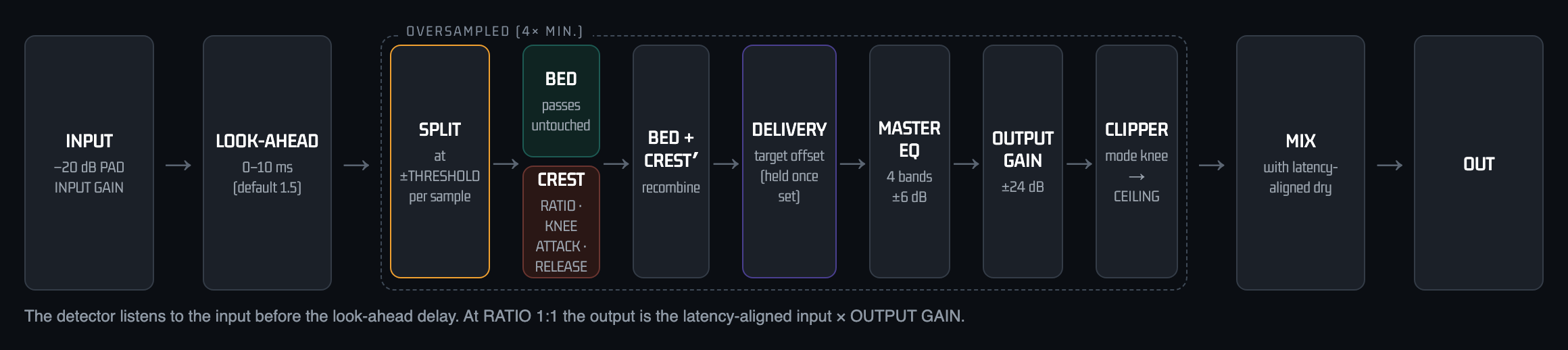
It splits the signal at the threshold into Bed and Crest, controls only the Crest, and translates the result to a delivery level against built-in streaming and broadcast targets. It can also master audio files offline and assemble albums.
This manual covers CYANO (VST3, AU, AAX and Standalone). The channel compressor and the one-panel GLUE processor have their own manuals — see Other Manuals in the sidebar.
Core Philosophy — Reference, Not Peak
In CYANO, delivery target is not loudness measured around peak. In Stage A, Threshold you set becomes musical Reference Position, used as basis for Output Gain in Stage B. Therefore peak in Stage B is result, not control variable.
Reference → Translation → Delivery
Legacy: Peak → Limiter → Loudness / CYANO: Reference → Translation → Delivery.
Displayed target is not a value to chase but coordinate where your musical Bed was delivered.
Target = Bed Position + Output Gain
Example: Threshold = -14 dBFS → Reference = -14, Output Gain = +1 dB → Display = -13 dBFS. Even if True Peak -7 dBFS, Wheel shows -13. Because Peak is not Reference.
Product Family Overview
The CYANO Platform has three products that share the CyanoCore™ engine. This table lists what each one actually contains.
| Feature | CYANO | CYANO CH | CYANO GLUE |
|---|---|---|---|
| Role | Mastering processor | Channel compressor | One-panel processor |
| CYANO / CLASSIC engine | ✓ | ✓ | ✓ |
| Compressor controls | Full engine | 8 knobs | Threshold orb + gain faders (ratio and timing fixed) |
| External sidechain | — | ✓ | — |
| Master EQ & Spectral Balance | ✓ | ✓ | — |
| Delivery Target | ✓ | — | ✓ |
| Offline mastering, Album & Export | ✓ | — | — |
| Visualizers | Full set (Topology, Goniometer, Spectrogram, Timeline) | Spectral Balance (Monitor, Timeline, Radar) | Orb (SCAN, FIELD, RADAR) |
| Preset slots | A – D | A – B | A – B |
| −20 dB input pad | ✓ | ✓ | ✓ |
| Formats | VST3 · AU · AAX · Standalone | VST3 · AU · AAX · Standalone | VST3 · AU · AAX · Standalone |
Which Product Are You Using?
CYANO
Complete process. Reference implementation of CyanoCore™ with full control of Threshold, Ratio, Topology, Delivery.
CYANO GLUE
Set threshold to catch only peaks, adjust output gain to show target corresponding to output loudness.
CYANO CH
Understand full version first, then CYANO CH for channel dynamics. CLASSIC mode like conventional compressor and CYANO mode preserves Bed and controls only peaks.
Target Display Principle (All Products)
We do not chase Target. We display Target matching output RMS. Threshold creates Reference Position (Stage A), Output Gain translates it (Stage B). Displayed number is delivery target, not limiter result.
Introduction
Welcome to CYANO Platform — professional audio processor family based on CyanoCore™. Shares same philosophy and quality with different workflows. Delivery target is defined as translated reference position, not peak.
CYANO is dynamics processor designed from fundamentally different premise. Musical cohesion (Glue) is not achieved by compressing mix uniformly over time, but by preserving musical Foundation. While conventional compressor applies single gain envelope to entire mix signal whenever threshold is exceeded, CYANO splits signal into two domains and processes independently.
Origin of Name — Cyanoacrylate
Name comes from compound cyanoacrylate known as instant adhesive. Like instant adhesive that forms strong bond without adding volume or deforming objects, CYANO creates powerful musical Glue where instruments blend harmoniously without collapsing musical Bed.
Glue Principle
In audio, Glue means cognitive effect where mix instruments interact consistently like single organism. Traditional compression tries to mimic by attenuating all elements simultaneously, but result transforms music via unwanted envelope alteration. CYANO achieves true Glue by controlling only Crest region above threshold that breaks proportional relationships, while continuously maintaining Bed.
- Bed Preservation: All signals below threshold pass without alteration.
- Crest Optimization: Gain reduction only to excessive energy above threshold.
- Musical Glue: Cohesion achieved by preserving, not collapsing, relationships.
- Visual Topology: Check split state in real time.
What This Manual Covers
This document serves as both professional user guide and technical white paper. Reader is assumed professional engineer familiar with gain reduction, attack/release, loudness normalization.
Why Traditional Bus Compression Transforms Music
Most widespread misconception is that compressor only reduces peak signal exceeding threshold. In reality it never works that way.
What actually happens: Moment transient peak exceeds threshold, gain reduction is applied equally to entire signal coexisting in mix at that moment. Compressor cannot distinguish peak instrument that triggered event from other instruments in bus signal.
When -3 dBFS kick exceeds -6 dBFS threshold, vocal, reverb, strings not exceeding threshold are uniformly attenuated, envelope deformed.
- Envelope deformation, Loss of spatial depth, Cognitive density distortion, Relationship distortion
Fundamental architecture problem: Traditional compressor compresses everything whenever peak occurs. Larger gain reduction, more Bed damaged, structural limit unsolvable by attack/release tuning.
Why CYANO Exists
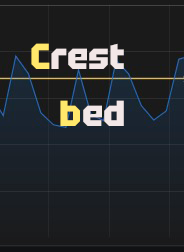
CYANO excludes global attenuation and achieves perfect musical Glue. Inspired by fact that arbitrary audio signal can be perfectly modeled as sum of two components.
A = B + C
A: Entire original signal
B (Bed): Sustained source below threshold, harmonics, root
C (Crest): Headroom-exhausting peak energy
Instead of shaving A, CYANO isolates: Output = B + C′
B: Passes without alteration, actual output uses B
C′: Optimized Crest
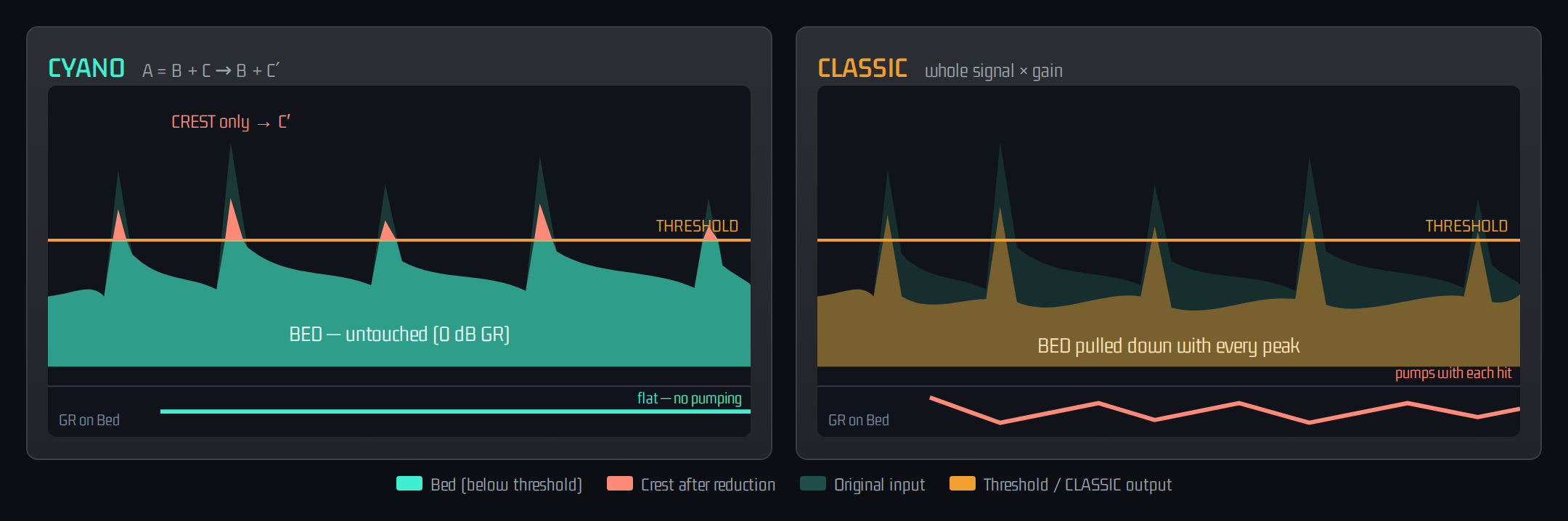
When kick transient occurs, gain reduction applies precisely only to Crest region exceeding threshold. Vocal or room (Bed) untouched, so no pumping.
Glue Through Preservation and Loudness is final stage only — musical optimization and delivery level perfectly separated.
Bed vs Crest
Threshold as Partition Boundary
In traditional compressor threshold is 'point where compression starts'. In CYANO definition is different and more precise: Partition Boundary dividing Bed and Crest domains.
Bed: Musical Foundation
All components below threshold such as instrument sustain body, reverb tail, noise floor, reaching output without gain reduction.
Crest: Excessive Peak Energy
Signal soaring beyond threshold such as transient hits, only region subject to dynamics operations. Also target for full utilization of headroom because peak is controlled.
Precise Split Process
B/C split calculated in real time at internal oversampling rate. Dual EMA smoothing blocks noise, ensuring clean sound during automation.
Steady-State Identity
With fixed threshold, split satisfies B + C = A at every sample, output perfectly matches input when no crest energy.
Core Concepts
Bed: signal below threshold, always preserved foundation. Crest: signal above threshold, excessive energy peak subject to dynamics. Threshold: partition boundary level. Glue: natural cohesion obtained by protecting foundation. Target: final platform loudness spec and input/output gain adjustment guide.
Quick Start
Workflow Principle
Capture Glue first, then adjust final Output to show corresponding Target. Do not try to match loudness first.
- Loop most energetic part
- Select CYANO engine mode
- Attack minimum for clear Crest operation
- Ratio 5:1+ to find threshold boundary
- Lower threshold to control only excessive Crest peaks. Stop just before Bed shakes. Must be natural sound with no noise
- Check Glue by ear. Foundation identical to input
- Adjust Output Gain to create desired target
Signs of Correct Glue
- Kick and snare tight and clear
- Bed spatial reverb and sustained instruments maintain original
- No artificial pumping
Interface
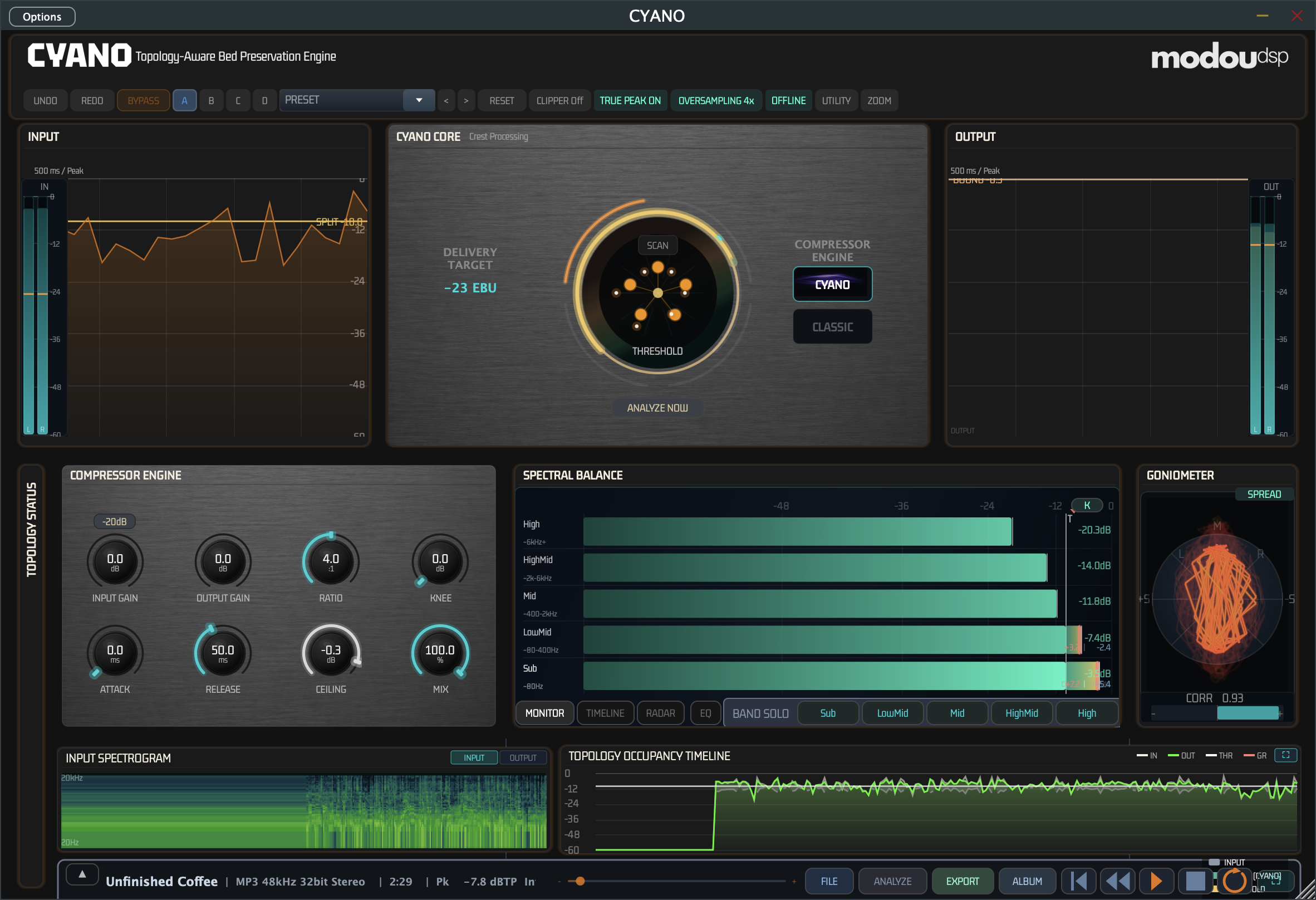
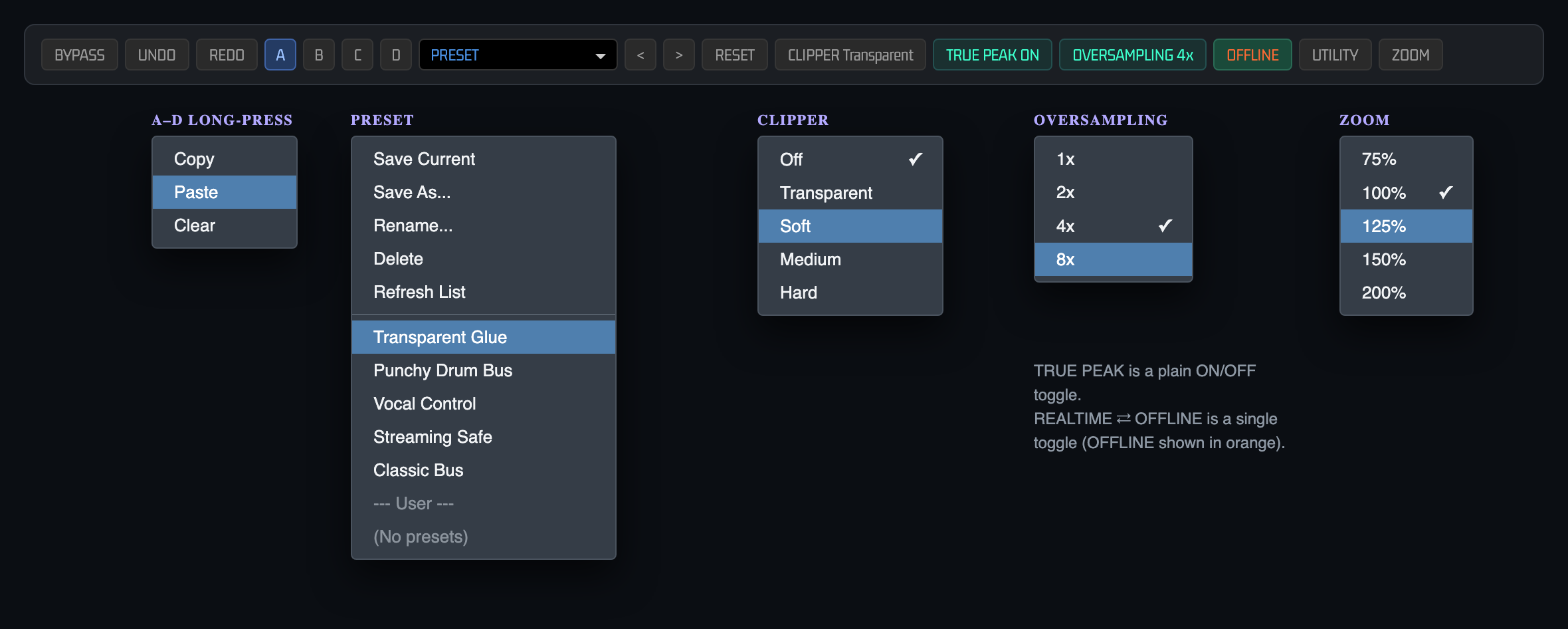
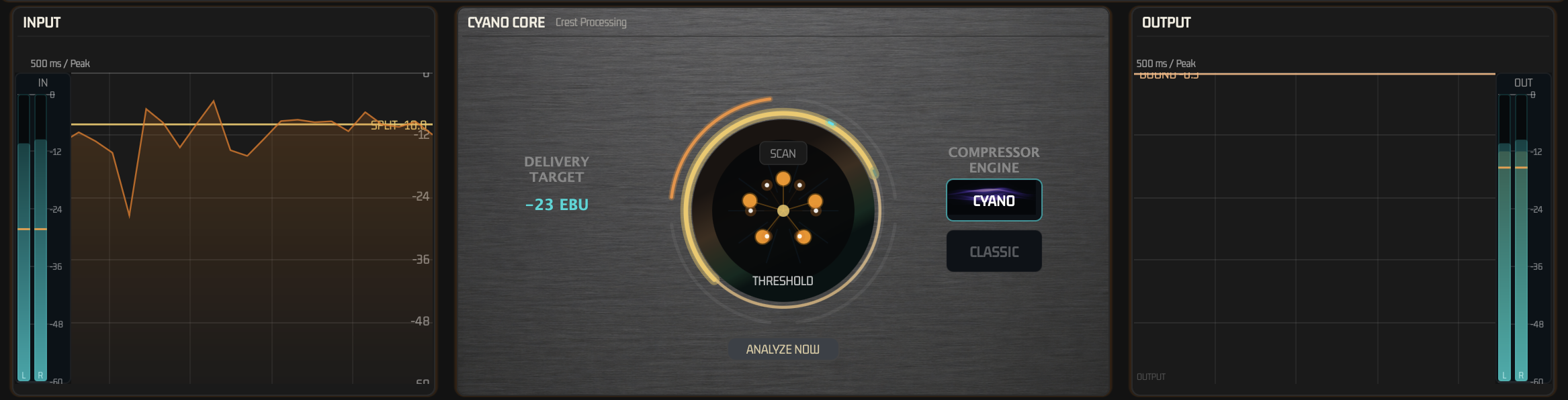
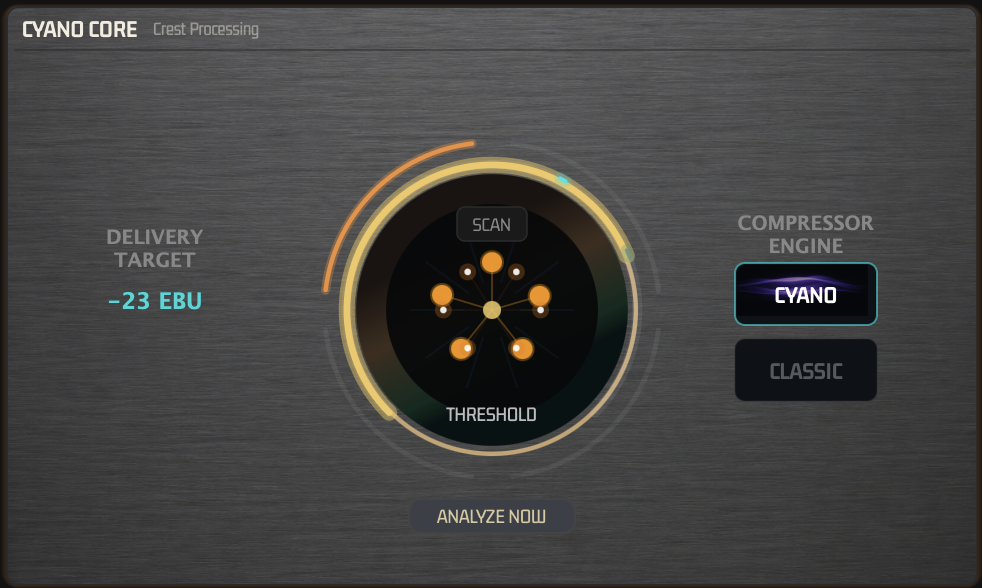
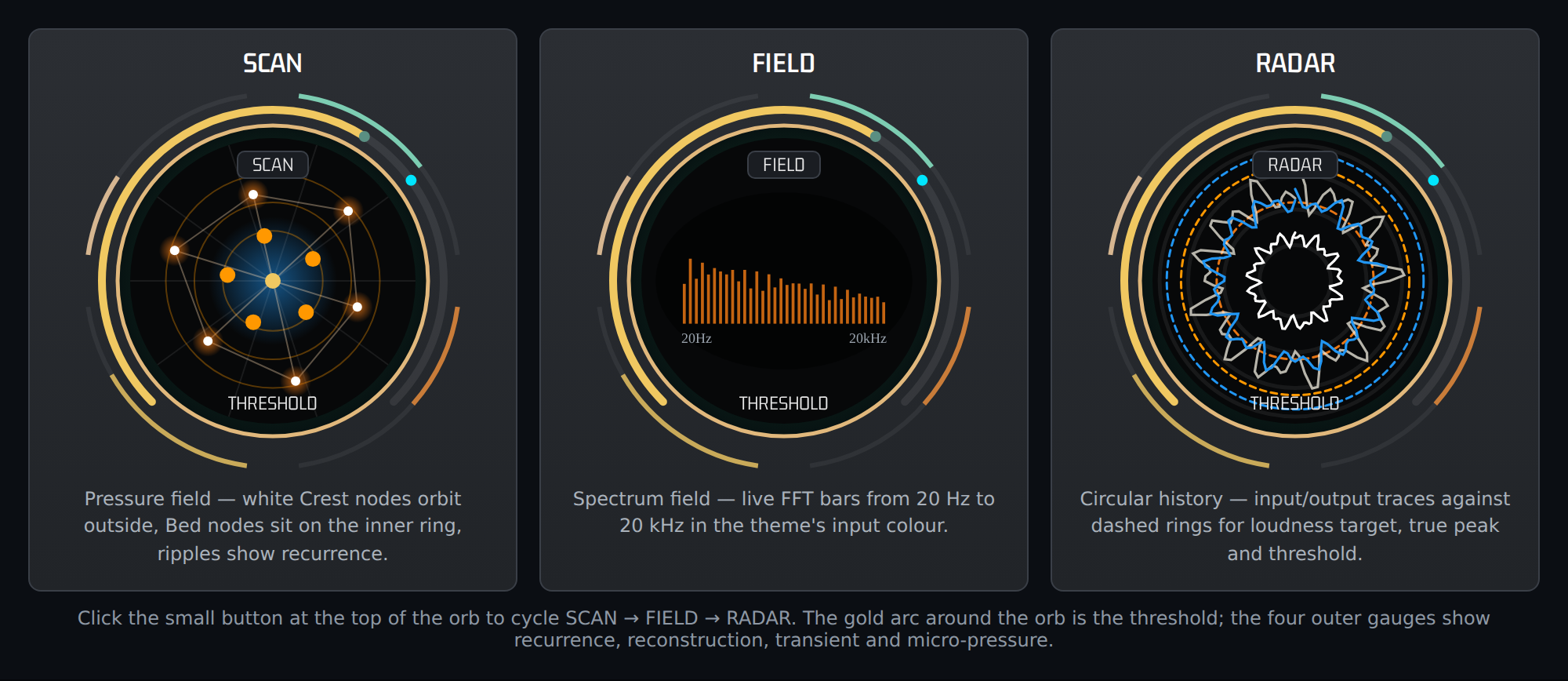
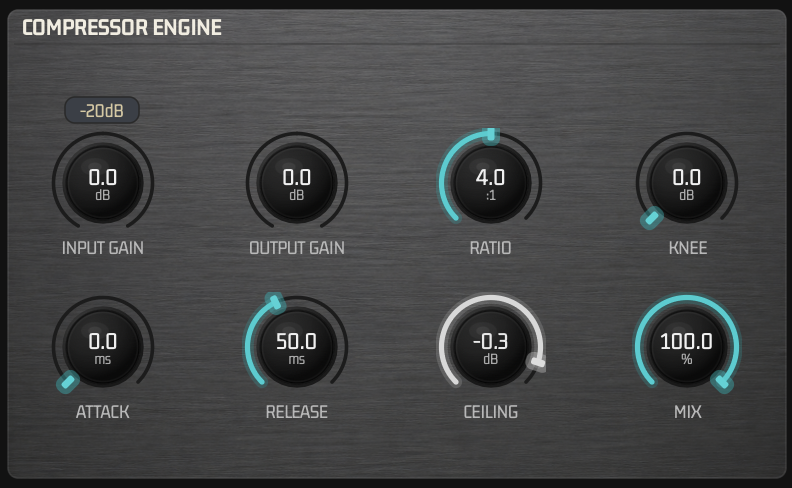
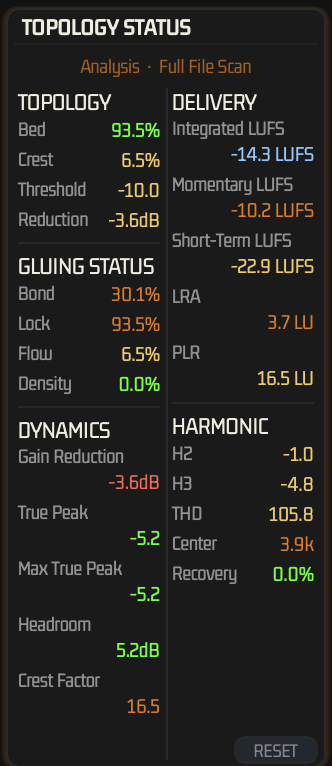
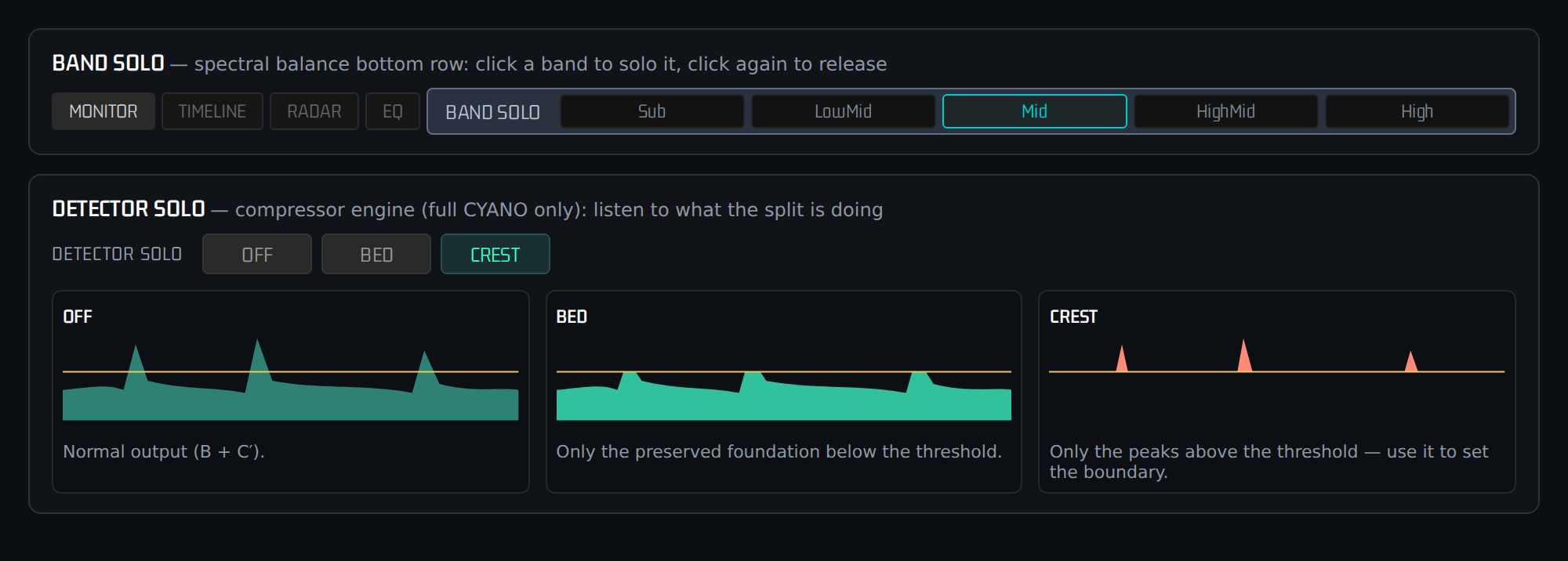
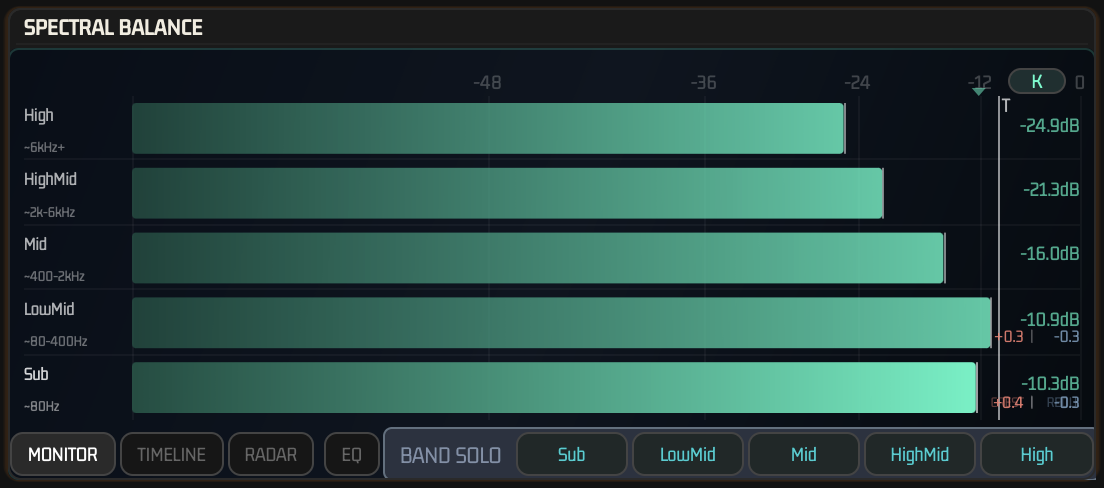
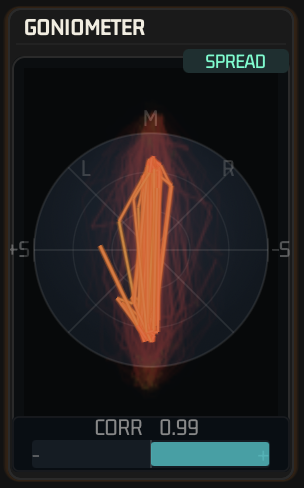
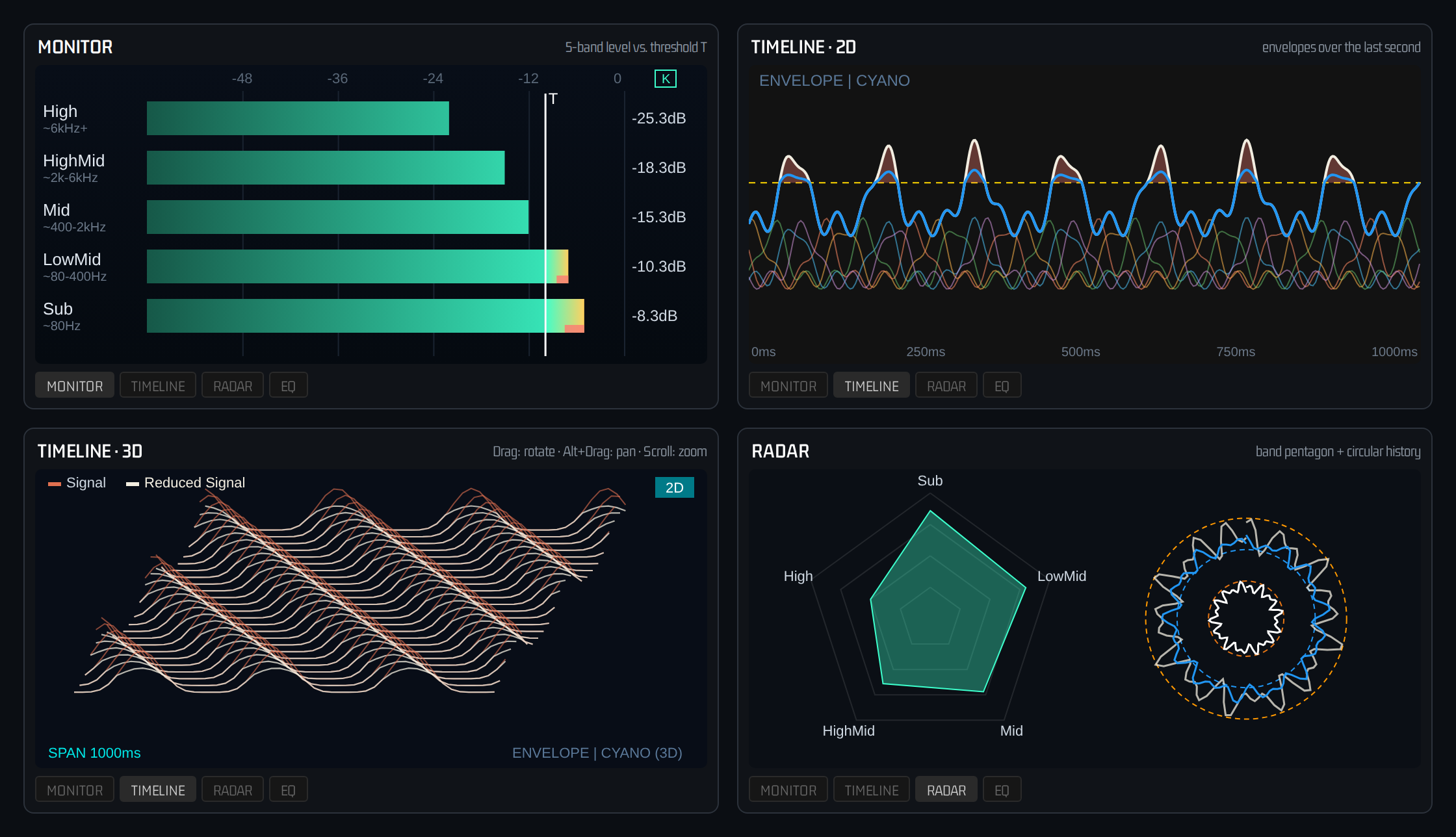
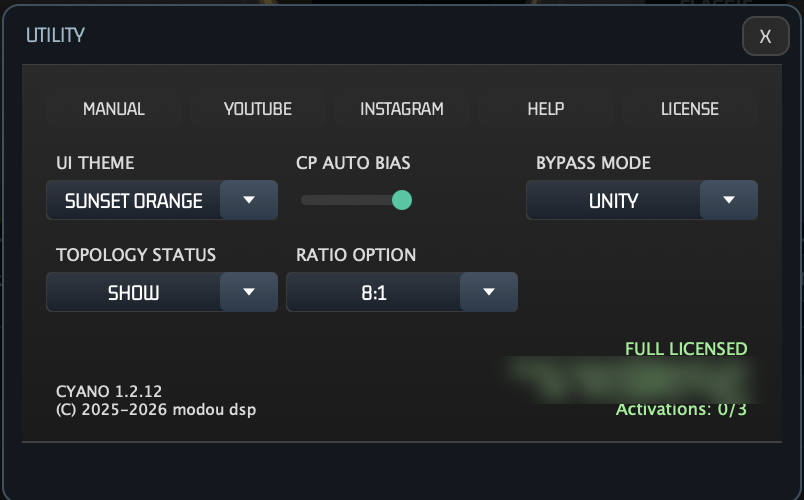
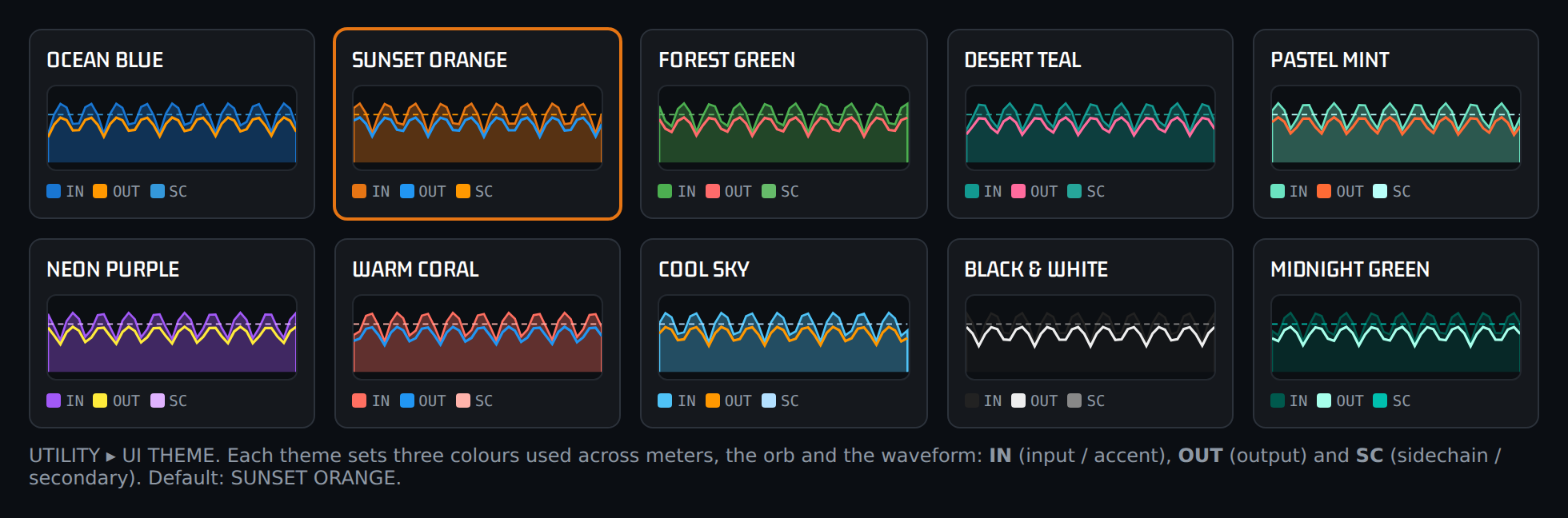
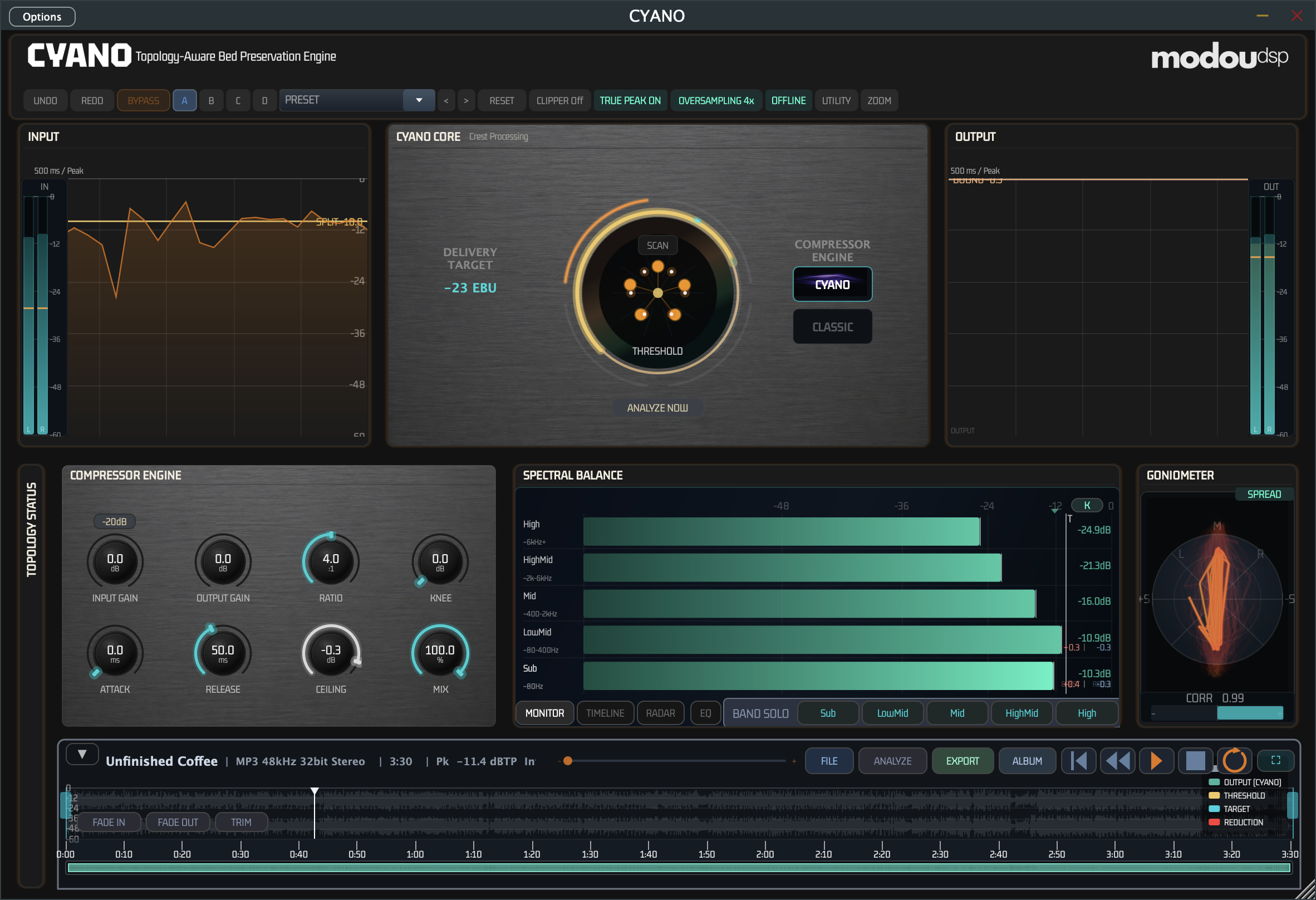
All visual elements help check and monitor Bed/Crest split state in real time. Header: BYPASS, Preset Slots A/B/C/D, Clipper OFF/Transparent/Soft/Medium/Hard, TruePeak, Oversampling 1X/2X/4X/8X, Utility, License, UI THEME 10 colors, BYPASS MODE GAIN/UNITY, TOPOLOGY STATUS, Ratio Mode. Core: Large threshold knob, DELIVERY TARGET RMS-based, THRESHOLD -40~-0.1 dBFS, Visualizer FIELD/SCAN/RADAR, Engine Selector CYANO/CLASSIC seamless fade. Output Panel: Threshold Line amber, GR Fill salmon overlay only above threshold in CYANO proving preservation, ZOOM via wheel. Engine Panel: INPUT/OUTPUT GAIN, -20dB Pad, RATIO/KNEE, ATTACK/RELEASE, CEILING/MIX, DETECTOR SOLO OFF/BED/CREST. Topology Status: Bed%/Crest%/Threshold/Reduction, Bond/Lock/Flow/Density, GR/True Peak/Headroom/Crest Factor, Integrated/Momentary/Short-Term/LRA/PLR, H2/H3/THD/Center/Recovery. Spectral Balance: 5-band, TIMELINE 2D/3D. Goniometer: Lissajous CORR +1.0~-1.0, SPREAD butterfly 31-band.
Rack View
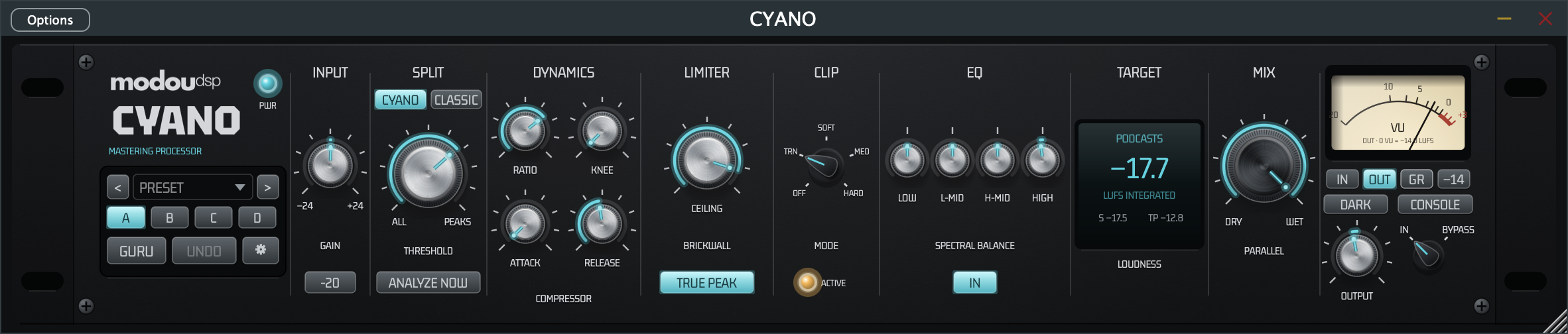
Full CYANO opens in the Console window described above. RACK in its header bar switches to the Rack view — the same controls as one 2U hardware rack unit; CONSOLE, next to the IN / BYPASS selector on the plate, switches back. Every time the plugin window opens it starts in the Console; RACK switches only the window that is open. Both views use the same parameters, so switching never changes the sound. The Rack view is in full CYANO only; GLUE and CH keep their own windows.
The Plate, Left to Right
| Section | Controls |
|---|---|
| Recall block | Preset menu with < >, slots A–D, UNDO / REDO, GURU and ⚙ (window size) |
| INPUT | GAIN (−24 … +24 dB) and the −20 pad |
| SPLIT | CYANO and CLASSIC above the THRESHOLD knob — exactly one is lit, click the other to switch engines. ANALYZE NOW below the knob runs CP Auto and counts down 3-2-1-GO, as in the Console |
| DYNAMICS | RATIO, KNEE, ATTACK, RELEASE |
| LIMITER | CEILING and TRUE PEAK (LOOK-AHEAD is in Guru) |
| CLIP | Mode selector: OFF, TRN, SOFT, MED, HARD |
| EQ | LOW, L-MID, H-MID and HIGH gain of the Master EQ, and IN |
| TARGET | LED panel, centred in the section: the delivery target, integrated loudness, short-term loudness (S) and true peak (TP) |
| MIX | Parallel blend from DRY to WET |
| OUTPUT | VU meter with IN / OUT / GR and the reference button, the OUTPUT knob, the IN / BYPASS selector, LIGHT / DARK and CONSOLE |
Knobs turn by dragging; double-click resets them. On a selector, click toward a position to select it, click the centre to step to the next one, or drag to sweep.
Plate: LIGHT / DARK
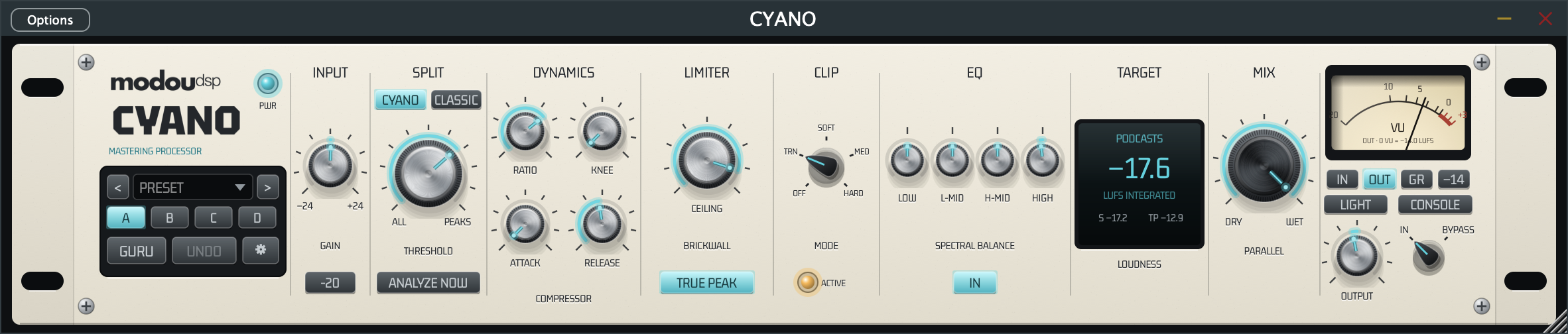
The rack is 1180 wide at 100 %, the same width as the Console, so switching between RACK and CONSOLE only changes the window height. The LIGHT / DARK button under the VU meter, next to CONSOLE, shows the current plate finish: ivory (LIGHT) or black matte plastic (DARK). Click it to switch. The choice is remembered and changes nothing in the sound.
VU Meter
The needle has standard VU movement (IEC 60268-17): it reaches 99 % of a steady reading in 300 ms with about 1.5 % overshoot, and falls at the same rate.
- IN / OUT — input or output momentary loudness against the reference. The reference button steps through −23, −20, −18, −16, −14, −11 and −9 LUFS at 0 VU, and TGT, which uses the Loudness Target.
- GR — the gain reduction in dB. The reference button is not used.
Guru Mode
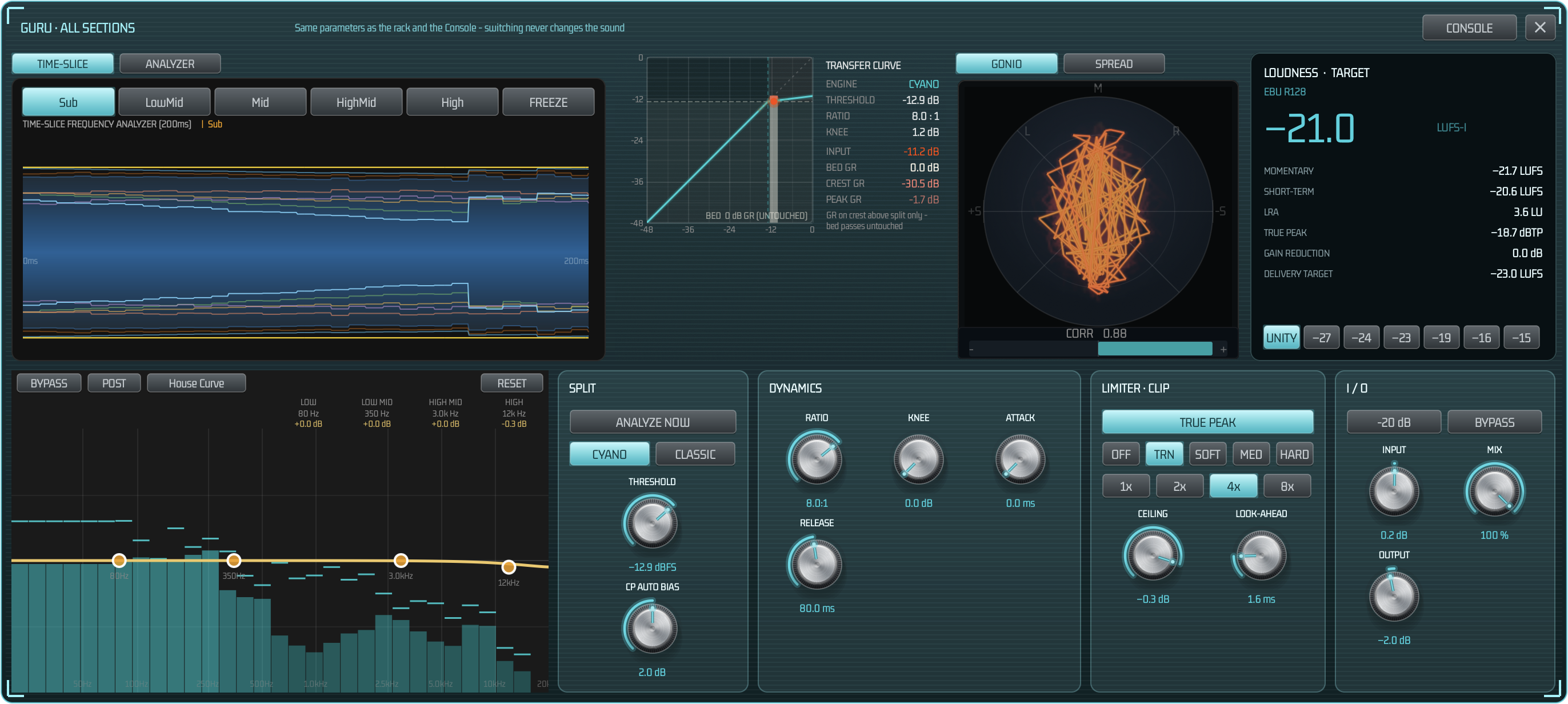
Guru is the Rack view's detail layer: a glass window that opens over the rack with every control of a section and the live view that shows what it does. It uses the same parameters as the plate and the Console, so everything you change there is undoable, saved with the session and heard immediately.
Opening and Closing
- One section — move the mouse over the plate: a section highlights and the cursor becomes a hand. Click it to open GURU · SECTION.
- All sections — click GURU in the recall block to open GURU · ALL SECTIONS; the button stays lit while it is open.
- Close — click ✕, click the same section or GURU again, or click an empty part of the plate. CONSOLE in the window's title bar switches to the Console view.
The window opens above the rack (below it when the screen has no room above), is scaled like the plugin window and follows it when you move the host window. It closes with the plugin window.
GURU · ALL SECTIONS
- Top row, live views: the waveform view with two tabs — TIME-SLICE (the time-slice frequency analyzer over 200 ms with Sub, LowMid, Mid, HighMid, High and FREEZE) and ANALYZER (the Console analyzer with MONITOR, TIMELINE 2D / 3D, RADAR, EQ and BAND SOLO) — the compressor transfer curve with the moving operating point (the same graph as COMP CURVE in CH and GLUE: ENGINE, THRESHOLD, RATIO, KNEE, INPUT and BED / CREST / PEAK GR), the stereo view with GONIO (Lissajous with CORR) and SPREAD (stereo spread across frequency, with CORR kept below), and the LOUDNESS · TARGET panel.
- Bottom row: the Spectral Balance EQ (drag the band nodes; BYPASS, PRE / POST, House Curve and RESET, as in the Console) and the control cards SPLIT, DYNAMICS, LIMITER · CLIP and I / O.
Section by Section
| Section | Live view | Controls in Guru |
|---|---|---|
| INPUT | Waveform view | −20 dB PAD, GAIN |
| SPLIT | Transfer curve | CYANO / CLASSIC, ANALYZE NOW, THRESHOLD, CP AUTO BIAS |
| DYNAMICS | Transfer curve | RATIO, KNEE, ATTACK, RELEASE |
| LIMITER | Waveform view | TRUE PEAK, OVERSAMPLING (1x, 2x, 4x, 8x), CEILING, LOOK-AHEAD |
| CLIP | Waveform view | Clipper mode (OFF, TRANSP., SOFT, MEDIUM, HARD), TRUE PEAK, CEILING |
| EQ | Spectral Balance EQ | EQ IN, band on / off (LOW, LM, HM, HIGH), gain and frequency of each band |
| TARGET | LOUDNESS · TARGET | K-system scale (K-20, K-14, K-12), OUTPUT |
| MIX | GONIO / SPREAD | PARALLEL |
| OUTPUT | Waveform view | BYPASS, OUTPUT |
Every Guru knob shows its name above and its live value below. ANALYZE NOW in Guru shows the same 3-2-1-GO countdown as the plate. The tab you choose in the waveform view and in the stereo view stays selected while the plugin is open.
LOUDNESS · TARGET Panel
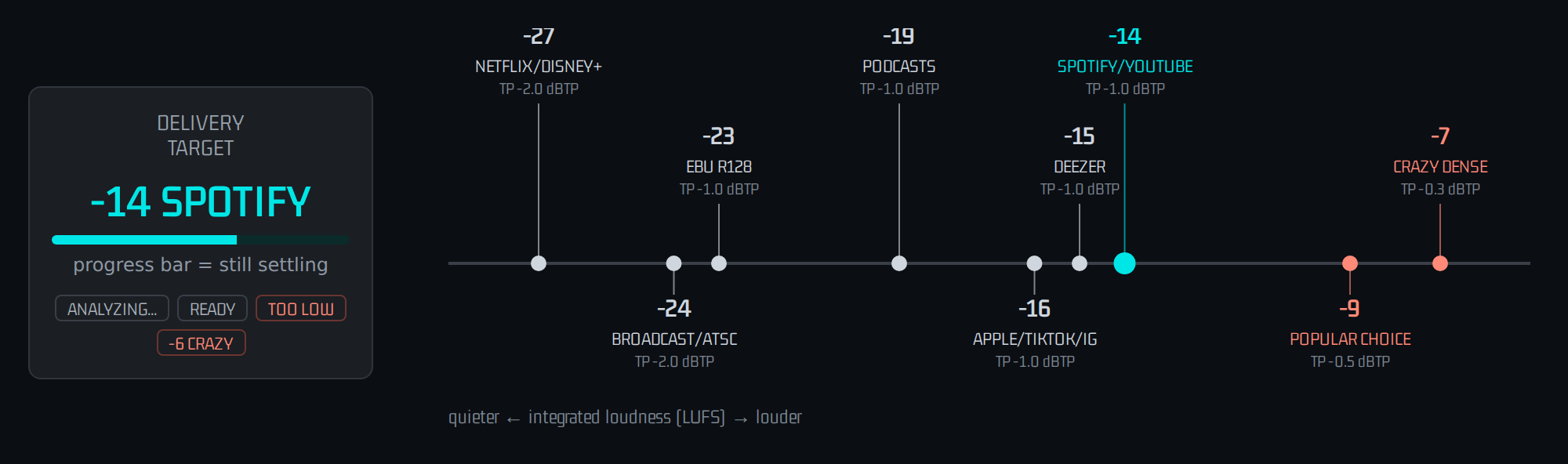
- Integrated loudness in large figures (LUFS-I), with a status word: READY before there is a reading, the nearest delivery standard while you play, TOO LOW at −30 LUFS or below and CRAZY at −6 LUFS or above.
- MOMENTARY, SHORT-TERM, LRA, TRUE PEAK, GAIN REDUCTION and DELIVERY TARGET.
- Target buttons: UNITY (analysis only, no delivery target), −27, −24, −23, −19, −16, −15 LUFS. Choosing one sets the delivery target exactly as the Console's target wheel does (see Delivery Target & Loudness).
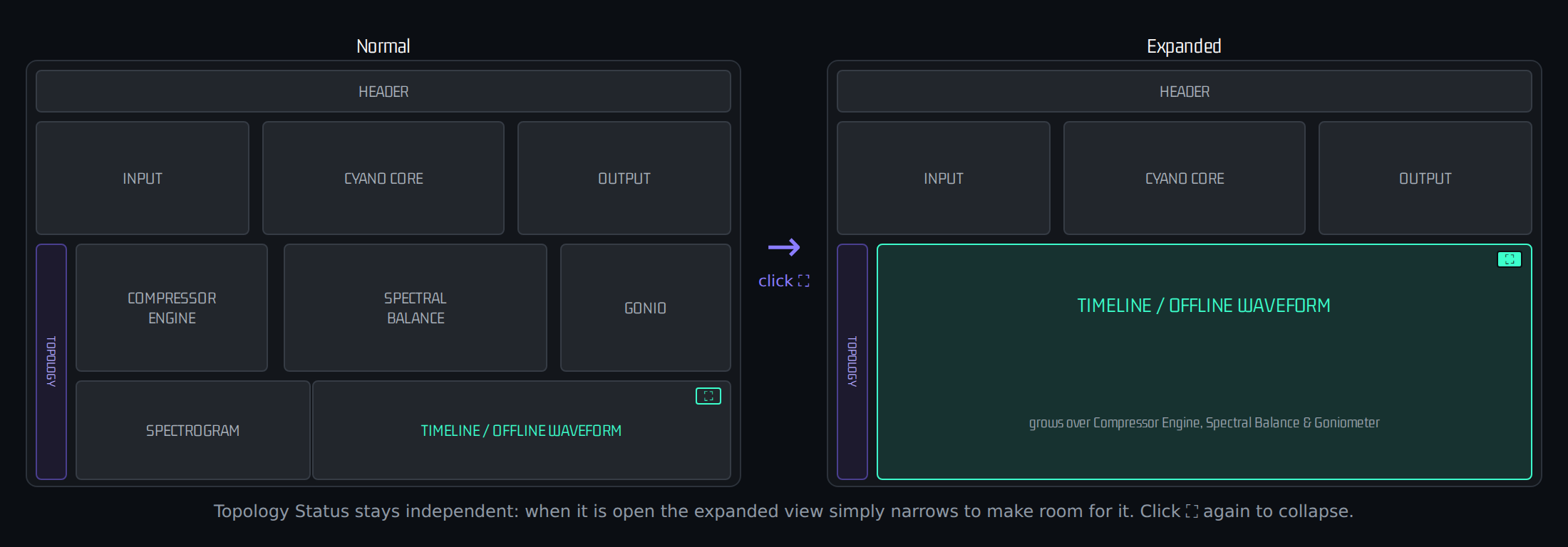
Topology Status opens and closes from its own tab on the left edge or from UTILITY ▸ TOPOLOGY STATUS (SHOW / HIDE); the two always stay in sync. It works independently of the expanded Timeline or offline waveform — when it is open, an expanded view simply narrows to make room for it.


Processing Modes
CYANO Mode: A = B + C topology, preserves sustain and reverb, maintains proportional relationships, builds best musical glue.
CLASSIC Mode: Traditional feed-forward compressor applies uniform gain reduction to entire signal. Use for pumping stylization.
| Feature | CYANO | CLASSIC |
|---|---|---|
| Bed attenuation during GR | None — 100% preserved | Yes — entire simultaneous |
| Crest peak target control | Supported | Not supported — whole batch |
| Artificial pumping | Structurally impossible | Always present (setting dependent) |
Delivery Targets
Target Guide: Interactive UI Reference — Not continuously varying DSP meter but interactive UI guide when setting final output level. Reacts only to Input/Output Gain manipulation (UI event). Tracks real output loudness while moving knob, holds after 400ms stop. Detection starts only when signal >= -30 LUFS, otherwise "TOO LOW". Turns salmon when exceeding target. Preset change, A/B/C/D slot change or reset resets detection. Before any signal or gain movement the wheel starts at a neutral -24 LUFS reference instead of 0. A thin progress bar under the value fills while the target is settling — during streaming-target analysis, or for about a second after any gain change of 1dB or more — so it is always clear when the number shown is still catching up.
| Format | Integrated Loudness | True Peak Ceiling | Standard |
|---|---|---|---|
| Spotify / YouTube | -14 LUFS | -1 dBTP | ITU-R BS.1770-4 |
| Apple Music | -16 LUFS | -1 dBTP | Apple Loudness |
| CD | -9 LUFS (ref) | -0.1 dBTP | Red Book |
| Unity | — | — | Auto solver off (input gain maintained) |
SPECTROGRAM shows input and output spectrogram. TOPOLOGY OCCUPANCY TIMELINE shows output history — click the expand (⛶) icon on its header to grow it inline over Compressor Engine, Spectral Balance and Goniometer; click again to collapse.
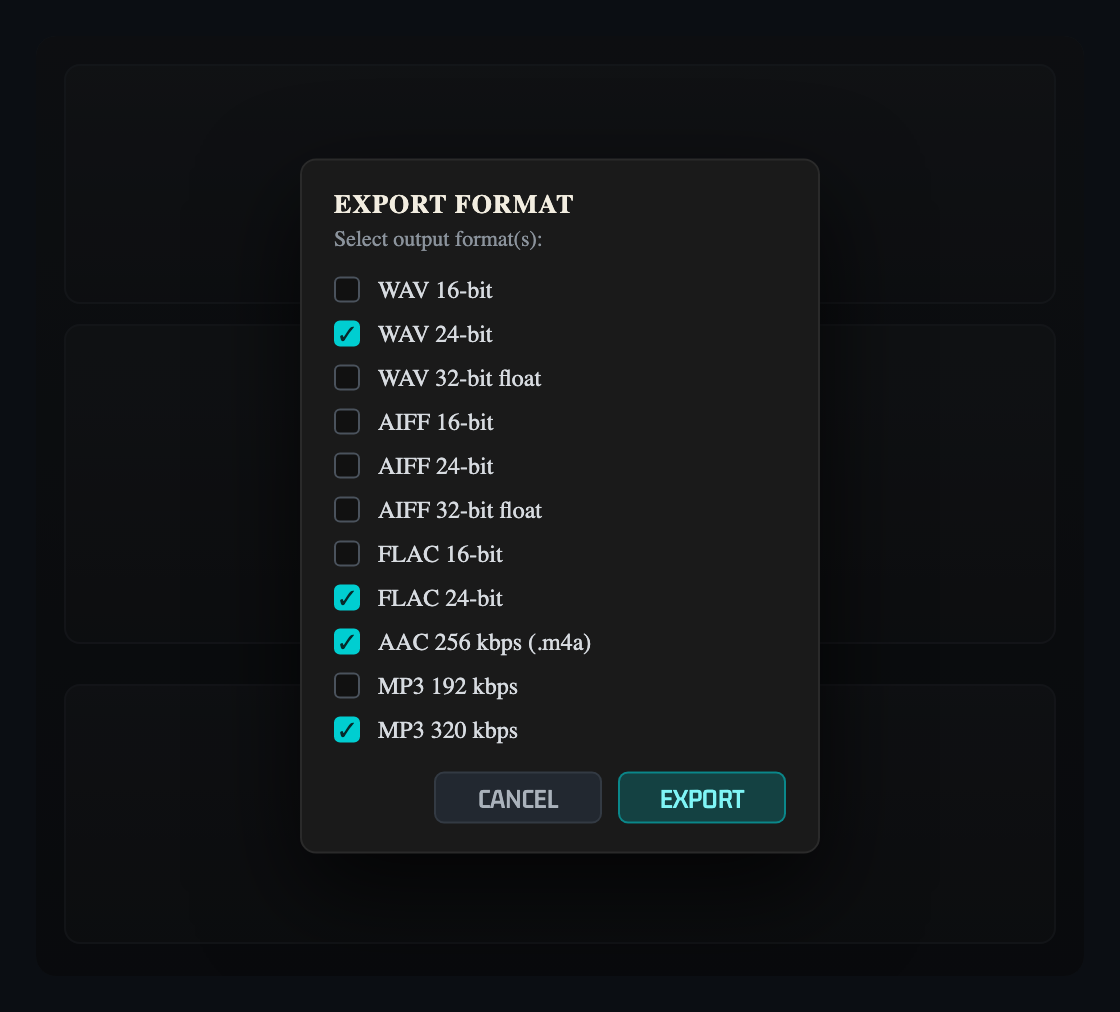
REALTIME/OFFLINE: The header button switches between processing the live input (REALTIME) and mastering a loaded file (OFFLINE — available in CYANO only). See Offline Mastering & Album for loading files, the waveform panel, trim, fades, sessions and album assembly. EXPORT opens a CYANO-styled dialog; WAV (fixed/float), AIFF, MP3 and FLAC can be selected together and exported in one pass.
Master EQ & Spectral Balance
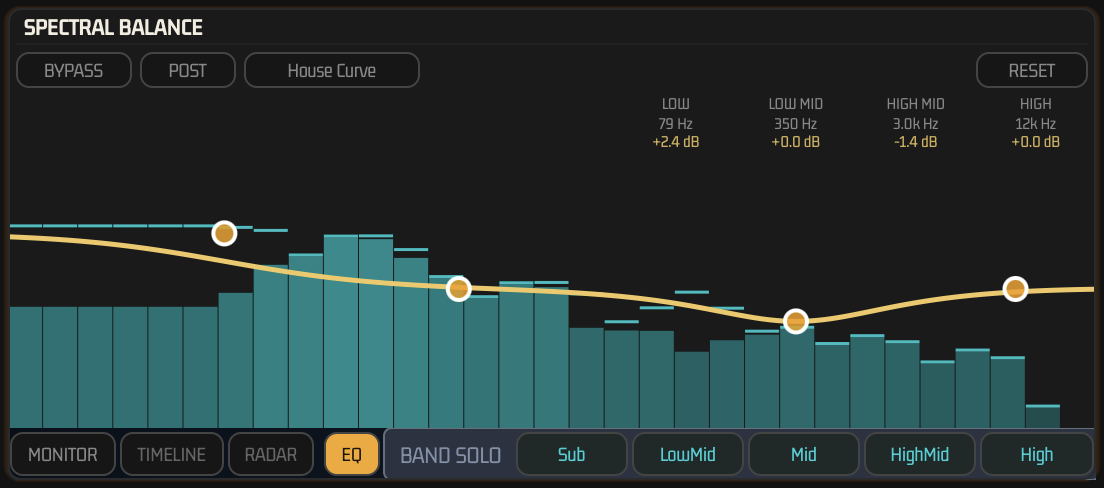
CYANO and CYANO CH integrate a transparent 4-band Master EQ directly into the SPECTRAL BALANCE panel — Low Shelf, Low-Mid Bell, High-Mid Bell and High Shelf, each with a fixed musical Q so the curve stays broad and mastering-safe. The EQ always runs after CyanoCore™ processing, as a final tone-shaping stage before Output Gain.
Reading the Overlay
Click EQ next to BAND SOLO to open the overlay. A 31-band real-time spectrum is drawn behind the curve so you can see exactly what you are shaping. Drag a node to set frequency (horizontal) and gain (vertical, ±6dB); double-click a node to reset its gain to 0dB; long-press or right-click a node to bypass that band individually.
BYPASS / PRE / POST
BYPASS disables the whole EQ (dry pass-through). PRE/POST does not move the EQ in the signal chain — the EQ always processes after CyanoCore™. It only selects which spectrum the analyzer displays: PRE shows the signal before the EQ touches it, POST shows the final EQ'd spectrum.
House Curve (Visual Reference Only)
House Curve overlays a translucent target-tonality reference shape, calibrated against broadband loudness rather than per-bin, for visual comparison only — it never affects the DSP or the audible signal. Long-press the House Curve button for Fixed / Follow-Output-LUFS calibration options.
RESET
RESET, at the top-right of the panel, restores all 4 bands to their default frequency and 0dB gain. It does not change BYPASS, PRE/POST, or any band's individual active/bypass state.
All 13 EQ parameters — per-band Frequency, Gain and Active, plus global Enable and Pre/Post — are fully automatable and are saved in the host session, in Presets, and in the A/B/C/D slots, so recalling a preset or slot restores the EQ exactly as it was.
Offline Mastering & Album
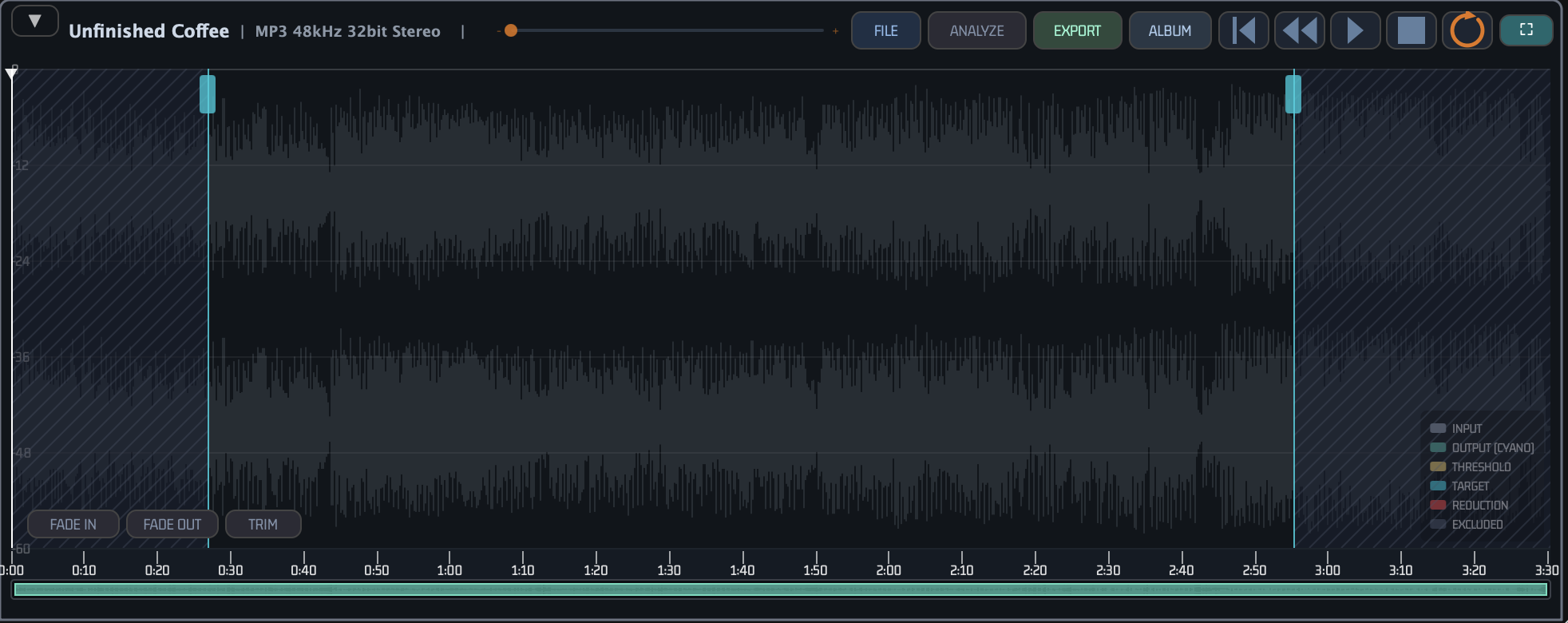
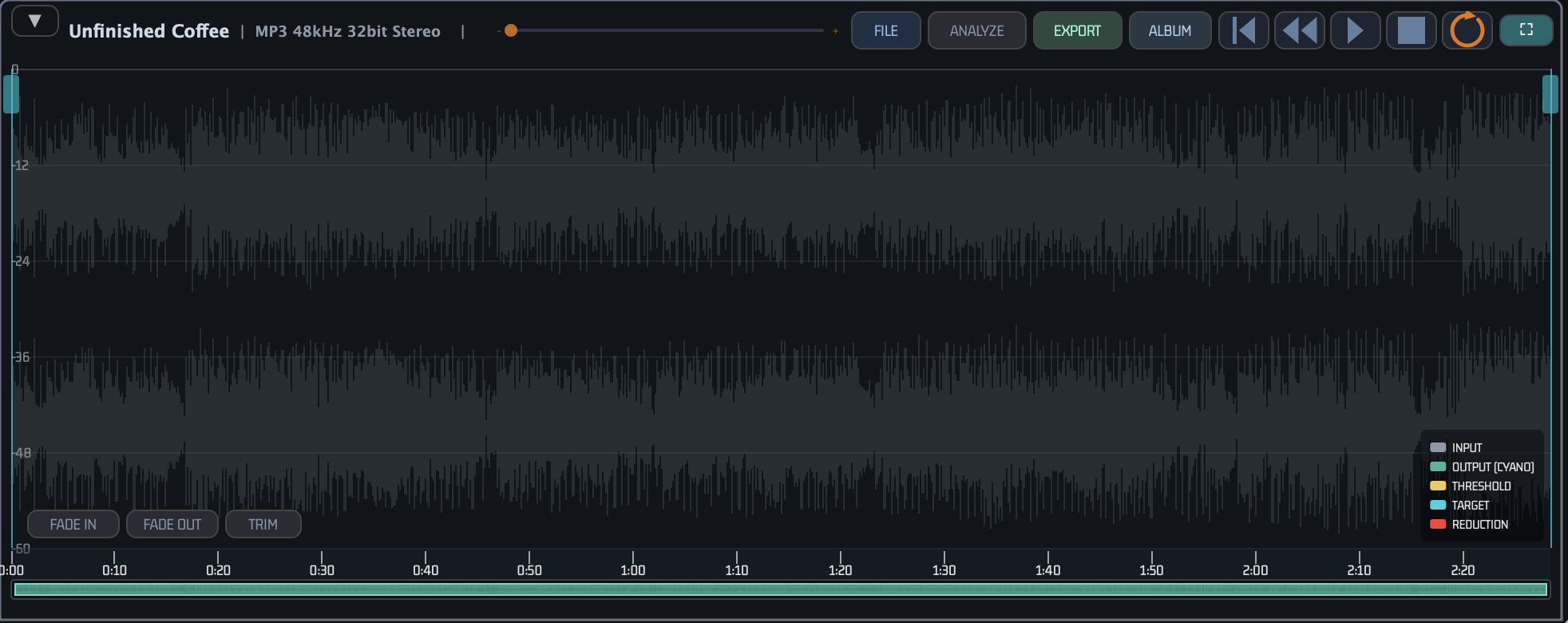
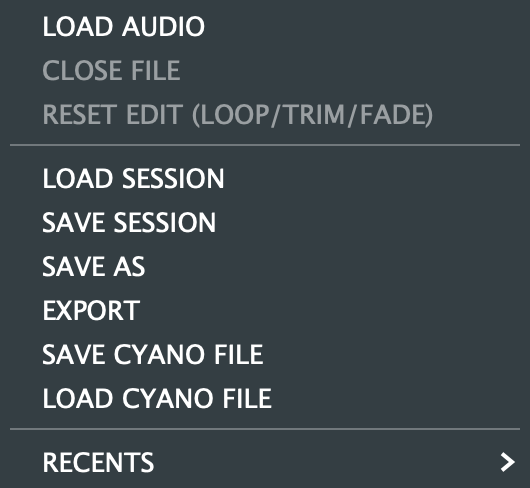
Switch the header to OFFLINE to master an audio file inside CYANO. The Standalone app starts in OFFLINE, and while OFFLINE is active the live audio input is muted — only the loaded file is processed; switch to REALTIME to work on live input. Load a file from the waveform panel's FILE menu (LOAD AUDIO or RECENTS). The panel shows the whole file with a time ruler, a zoom slider (or scroll wheel) and transport (RTZ, REW, PLAY, STOP, REPEAT); ⛶ expands the waveform over the lower panels. The colour overlay (INPUT, OUTPUT, THRESHOLD, TARGET, REDUCTION) is computed once when the file loads; turn on ANALYZE to keep it recomputing after every setting change.
Trim. Drag the cyan In and Out handles at the start and end of the waveform to set the range you want to keep — everything outside turns grey (EXCLUDED). Press TRIM to cut: the kept range becomes the whole timeline — it fills the waveform view, the ruler and play time start at 0:00, and zooming, scrolling, the overview strip and seeking all stay inside it. Drag the handles in again and press TRIM to cut further. Trimming is non-destructive: the source file is never modified, the cut is applied when you EXPORT or render, and FILE ▸ RESET EDIT or UNDO brings back the full length.
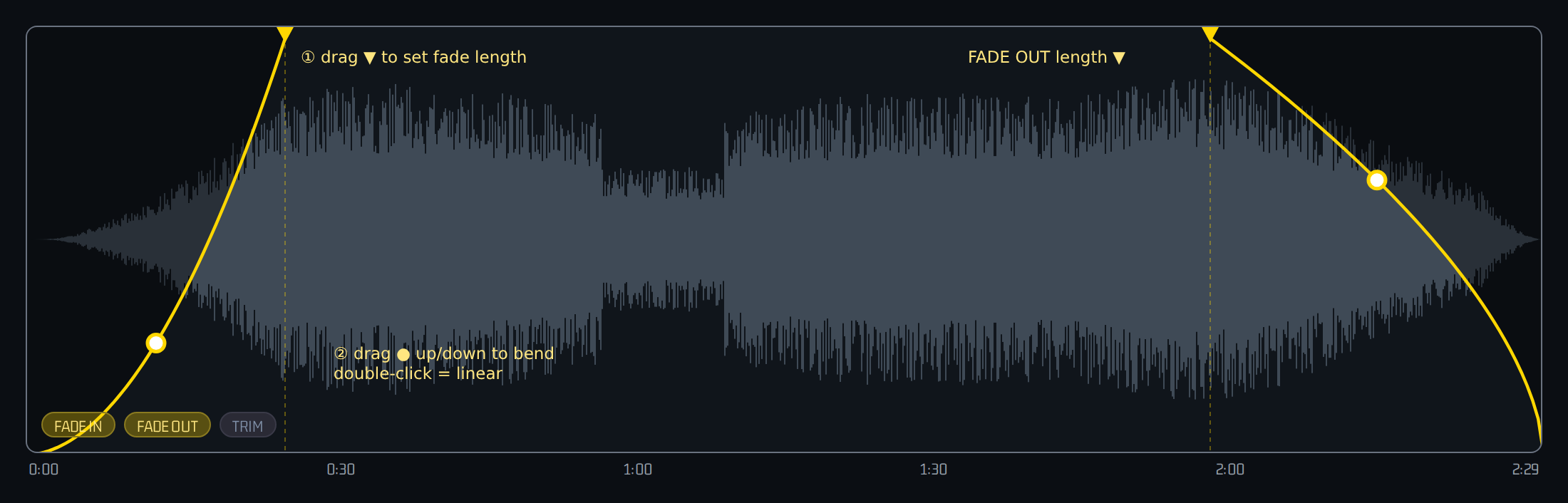
Fades. FADE IN / FADE OUT add a 0.5 s fade inside the kept range. Drag a fade's end handle to change its length and drag its midpoint up or down to bend the curve; double-click the midpoint to return to a linear curve.
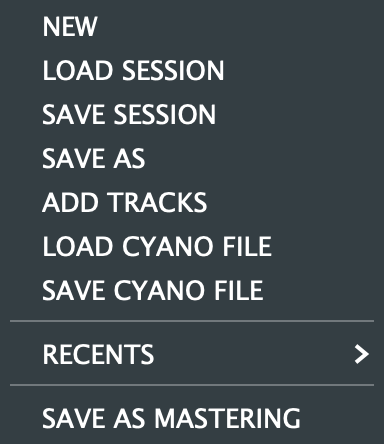
Sessions. SAVE SESSION / SAVE AS store the parameters together with the loaded file, trim, loop and fades; LOAD SESSION (or RECENTS) reopens them. SAVE CYANO FILE packs the audio and all four A/B/C/D presets into one portable .cyano session. Closing and reopening CYANO always starts with an empty offline workspace — reopen your work from a saved session.
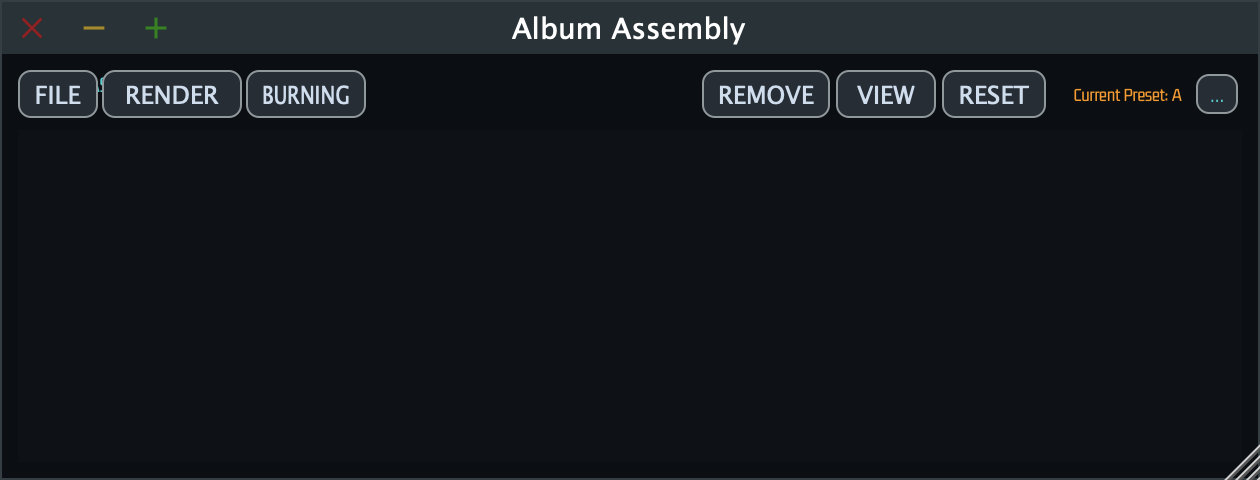
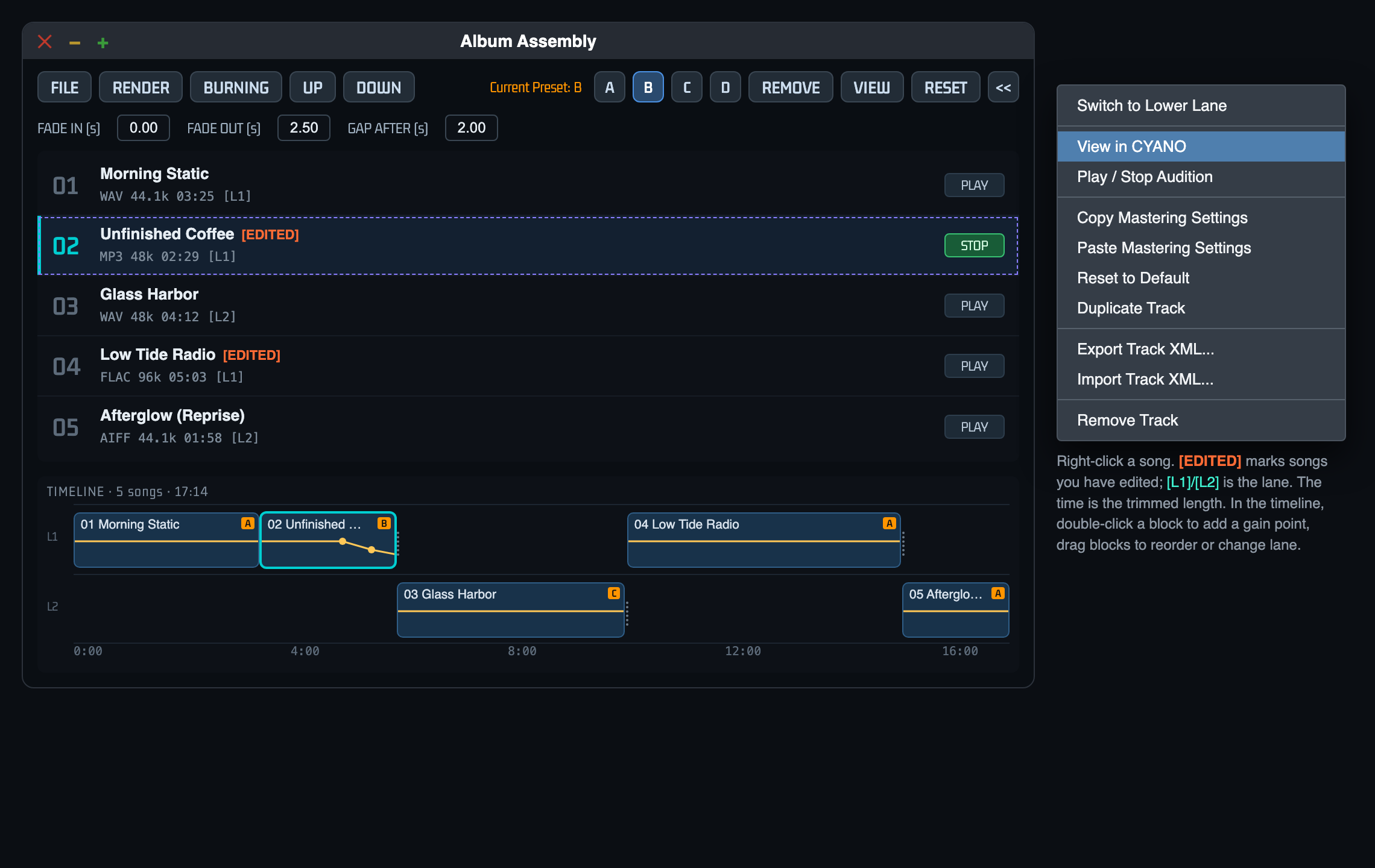
Album Assembly. ALBUM opens the Album Assembly window, where tracks are sequenced — each with its own A/B/C/D mastering presets — and rendered or burned as one album.

Design Philosophy
Pumping Essence
Traditional compressor's global attenuation pushes entire mix volume down when peak engaged then forced recovery during release, creating pumping artifact where reverb fluctuates. CYANO does not shave Bed in first place so there is no reverb to recover, structurally blocking pumping.
Envelope Collapse Mechanism
Existing compression applies attenuation curve to entire source during compression time, transforming even envelope of instruments below threshold. CYANO's Bed preservation delivers waveform envelope of below-threshold source to output 1:1 without alteration, delivering touch and texture original.
Crest and Headroom Exhaustion
Sharp momentary peaks not contributing to perceived loudness monopolize digital ceiling and hinder overall volume. By precisely handling only wasteful Crest peaks, average loudness (Crest Factor control) can be safely expanded without damaging musical foundation. Because Bed below peak moment is preserved, aggressive Crest control is possible.
Guarding Instrument Relationships
Humans perceive mix by comprehensive analysis of relationships. While traditional compressor inevitably distorts this balanced balance at every peak by compressor operation, CYANO keeps spatial ambience and reverb harmonics immovable like concrete and cleans only upper peaks, inducing overwhelmingly natural and musical result.
Engineers evaluate CYANO-processed sound as 'only solidity mounted as mix itself without stuffy or artificial smell unique to compressor' — possible because artifact factor where instrument foundation was unfairly shaved and envelope collapsed was structurally excised, core sound engineering aesthetics of CYANO.
Founding Principle
Essential reason for CYANO existence is not to make loudness thug that indiscriminately crushes sound. It is to perfectly preserve musical deep structure (Relationships) while wisely optimizing only excessive Crest energy destroying headroom. Loudness is following bonus, musical emotion is guarded by Bed preservation. Used innovatively in delivery stage of modern mastering that controls overall loudness while controlling only peaks and reducing dynamic range.
FAQ
Is CYANO compressor or limiter? Neither in traditional sense. CYANO is Bed preservation and Crest optimization processor. Includes compressor stage applying gain reduction, but unlike conventional compressor, reduction applies only to Crest region above threshold. Bed never compressed or limited. CLASSIC engine mode provided for special situations requiring traditional compressor-limiter behavior and comparison.
Does CYANO split frequency bands? No. B/C split is in level domain, not frequency domain. At each sample, regardless of frequency, energy below threshold is Bed, exceeding is Crest. All frequencies processed in same pass.
Can CYANO be used on individual tracks as well as mix bus? Yes. Applicable to stereo and mono channels. On individual tracks where transient Crest and sustain Bed distinction is clear like drums, bass, piano, powerful effect of Bed preservation architecture controlling only peaks without shaving instrument body. Of course CYANO CH can be used for light desired operation.
Does changing output gain change timbre or texture? No. Use target guide for input/output gain adjustment to reach loudness spec to create master of desired size, this process does not affect all compression-related parameters like threshold, ratio in previous Stage A at all, musically perfectly identical even if output to different Target in same session.
Digital noise occurs when monitoring Crest solo. Digital noise occurring from sample split during Crest solo monitoring is not error or bug, but inevitable part of arithmetic structure. Heard only in Crest solo monitoring.
How to use CYANO effectively? Most important is to set threshold level to position where Bed part is heard without any damage and only peak can be reduced. Then use output gain to match desired target.
Does CYANO support oversampling? Yes. Oversampling can be selected in CYANO core settings. Higher ratio reduces aliasing artifacts in gain computation stage.
Troubleshooting
Sound pumps unnaturally or over-compressed Cause: Threshold too low, body (Bed) that should be protected classified as Crest. Solution: Raise threshold until stable. If persists check mode is CYANO not CLASSIC.
No gain reduction, plugin seems not working Cause: Threshold higher than source peak, no signal crosses boundary, Crest not detected. Solution: Lower threshold until Topology Status GR indicator reacts to peaks. Check engine mode and BYPASS.
Output louder or quieter than expected Cause: Input Pad applied or output gain too large. Solution: Check Topology Status TARGET column whether Current converges to Target. Play enough to stabilize. To adjust manually change to Unity target then adjust Output Gain directly. Reset button or A/B/C/D sets also good for comparison.
Noise or artifact when manipulating threshold Cause: Too fast automation beyond EMA smoothing range or DAW sending stepped automation. Solution: CYANO threshold equipped with dual EMA smoothing circuit preventing normal operation noise. If still occurs increase automation density or reduce stepwise operation.
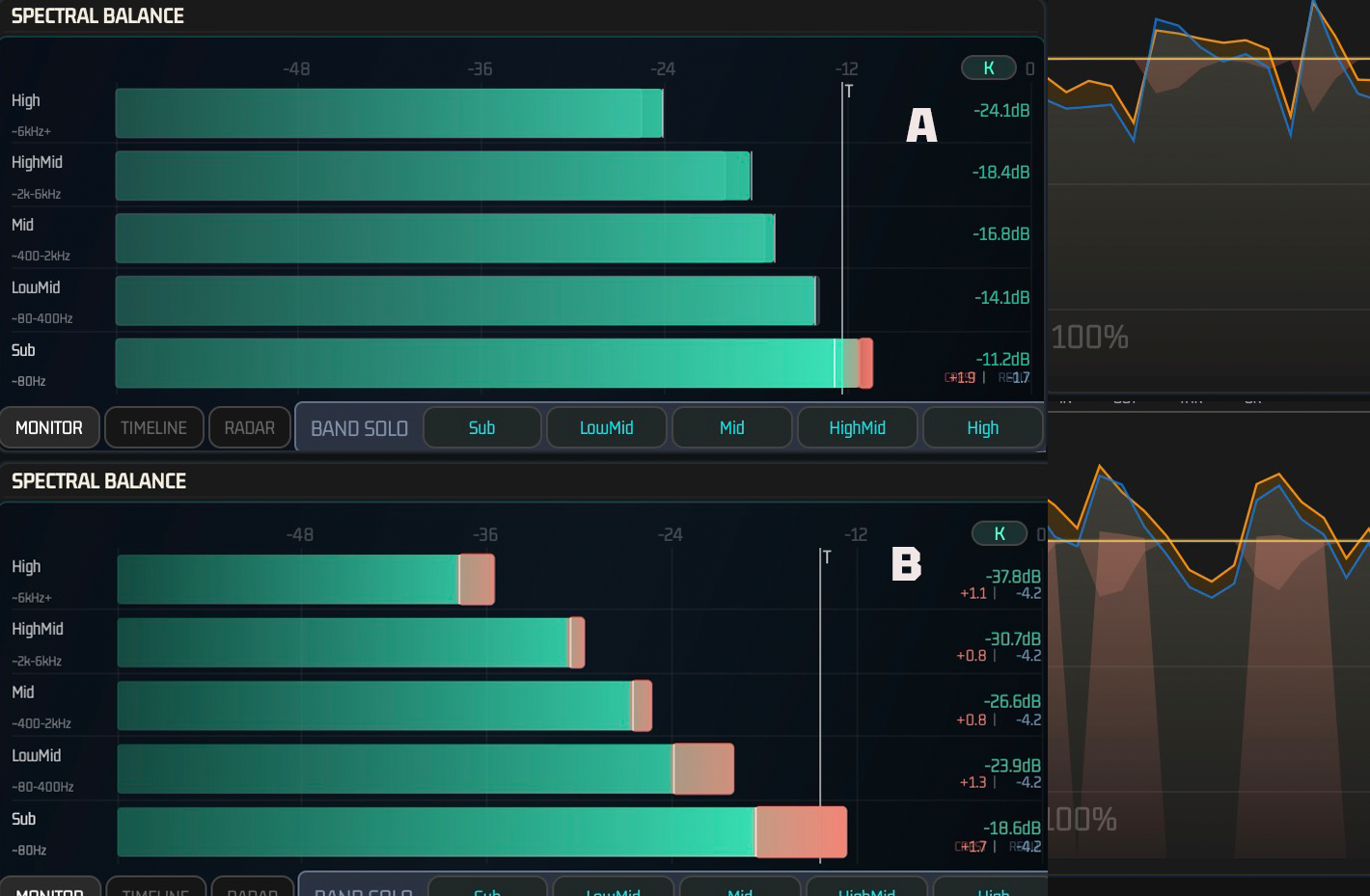
Tonal shift in Spectral Balance after processing Cause: Frequency band of Crest energy unbalanced. If high-frequency Crest proportion high, more compressed, resulting in low emphasis. Solution: Adjust threshold to reduce inter-band Crest proportion difference or balance with EQ before application.
Unexpected phase artifact in goniometer Cause: When inter-channel Crest energy differs greatly, high Ratio and short Attack cause extremely fast gain variation. Solution: Slightly slow Attack to soften formation and use Knee to make attenuation start gentle.
Technical Appendix
Signal Routing Path
Audio Input (A) → Input Pad Circuit −20 dB pre-attenuation → B/C Precise Topology Split Process → Crest Independent Compression (C → C′) → Signal Restoration Recombination Stage (B + C′) → Delivery Target Guide / Target LUFS Gain Adjustment Guide → True Peak Limiter Ceiling Guard → Final Output Gain Trim → Final Output
DSP System Spec
| Engineering Spec | Implementation Value |
|---|---|
| Plugin Format | AU, VST3, AAX Native, Standalone app fully supported |
| Oversampling | Linear-phase high-res filter based 1× / 2× / 4× / 8× selectable |
| Threshold Smoothing | 15 ms at internal split boundary circuit and 50 ms EMA high guard at detector decoupling stage |
| Metering Loudness Standard | EBU R128 and ITU-R BS.1770-4 precise metering equipped |