
Dynamics
Mastering for musicians
Finish what you made.
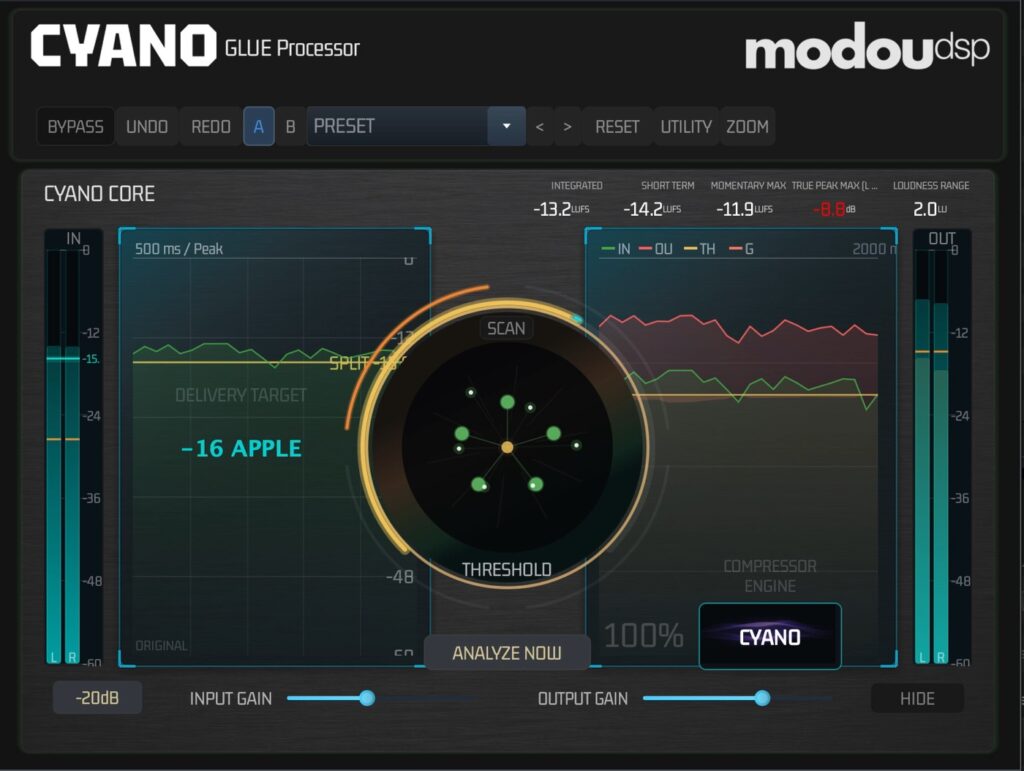
What It Does
Mastering comes down to one judgement: where does the music divide between what must be held and what can be shaped. CYANO GLUE makes that judgement by measuring it. ANALYZE NOW listens to three seconds of your track and places the boundary where your music actually splits.
Everything below it is the Bed — the depth, the tails, the weight, the space your song lives in — and it passes at full level even while the loud parts are being controlled. Only the Crest above it is reconstructed. That's why your music gets louder without getting smaller: the part that made it feel big was never the part being reduced.
You don't have to learn any of this to use it. You just have to press it.
Why one is enough
Press ANALYZE NOW and the hardest decision is already made. If you want a say in it, CP AUTO BIAS is the only dial that changes the character of that decision — gentler or firmer, in one direction. One button swaps the whole engine between CYANO, which keeps your track whole, and CLASSIC, when a song wants that familiar pumped feel on purpose. Then it tells you where you landed. Integrated, momentary and short-term loudness are measured to ITU-R BS.1770-4 / EBU R128 — the same standard the streaming platforms measure you with — sitting right on the front panel and resetting with a click. The waveforms slide out when you want to see what changed and disappear when you don't. Oversampling to 8×, a four-stage clipper and true-peak limiting mean the file you upload is safe before you upload it, not after you hear it back. It runs as VST3, AU and AAX in whatever you record in, and as a Standalone app when you just have a bounce and a song to put out. No session required, no chain to build, no second opinion to wait for.
Watch First
See It In Action
How It Works
Specifications & System Requirements
| Formats | Details |
|---|---|
| Plug-in formats | VST3, AU, AAX, Standalone |
| Operating systems | macOS 11+ (Apple Silicon native), Windows 10/11 (64-bit) |
| Sample rates | 44.1 kHz – 192 kHz |
| Tested DAWs | Logic Pro, Pro Tools, Ableton Live, Cubase, Studio One |
| License | 7-day trial (1 machine) · Perpetual (up to 3 machines), managed from your modou dsp account |
FAQ
Yes — every product gets a 7-day free trial. There's no separate trial build: install CYANO GLUE, then request your trial from inside the plugin or from the License page in modou Central.
Still stuck? MODU AI is in the corner of every page — it answers from the manuals and cites the section.
Sign in to search the manuals and ask MODU AI a question — it cites the exact section, every time.
Sign In