
Plugin
Putting a sound in a room
Pick a place. Choose how far.
What It Does
Choose a place. Choose a size. Position your mic.
Reverb is more than an effect. It's the virtual space you share with your listeners.
With modouVerb Lite, creating that space is simple.
PLACE — Where is your music?
Choose ROOM, HALL, CHURCH, or PLATE.
SIZE — How big is your space?
Choose SMALL, MEDIUM, or LARGE.
VIRTUAL MIC — Where are you listening from?
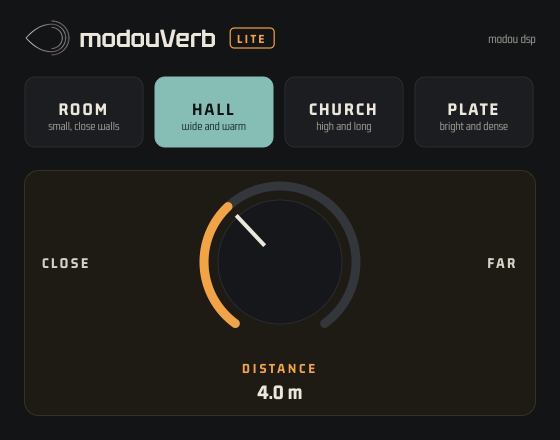
Move your virtual microphone closer to or farther from the virtual sound source. Experience how direct sound, early reflections, and reverberation naturally change with distance.
Behind these simple controls is a carefully designed acoustic engine that creates a believable sense of space, with natural early reflections, rich reverberation density, and musical clarity.
No complicated parameters. No endless tweaking. Just a beautiful space for your music.
modouVerb Lite — Share the Space. Share the Music.
Why one is enough
A part needs a character and a depth. Character: the four places cover the characters music reaches for. ROOM is small and close. HALL is wide and warm. CHURCH is high and long. PLATE is bright and dense. Depth: DISTANCE covers depth. Close keeps a vocal present with the room behind it; far sets a pad at the back of the hall. The direct sound, the reflections and the tail stay in the relationship a real room gives them. Because the room does the work, there is nothing left to set. There is no dry/wet balance, no preset to hunt for, and only two parameters to automate.
Watch First
Specifications & System Requirements
| Formats | Details |
|---|---|
| Plug-in formats | VST3, AU, AAX, Standalone |
| Operating systems | macOS 11+ (Apple Silicon native), Windows 10/11 (64-bit) |
| License | 30-day trial (1 machine) · Perpetual (up to 3 machines), managed from your modou dsp account |
FAQ
Yes — every product gets a 30-day free trial. There's no separate trial build: install modouVerb lite, then request your trial from inside the plugin or from the License page in modou Central.
Still stuck? MODU AI is in the corner of every page — it answers from the manuals and cites the section.
Sign in to search the manuals and ask MODU AI a question — it cites the exact section, every time.
Sign In